
Some games only know an Xbox controller. ACE COMBAT 8 and Hell Let Loose: Vietnam are such games. They do not see your stick at all. JoyPro turns your stick, throttle and pedals into a pretend controller (a virtual Xbox pad). The game sees an Xbox controller and plays with it.
(made while Start is on)
#Set it up once
- Set it all up for me
then Use these buttons - Set up the pretend controller
the second blue button - Install ViGEmBus
tick the box first - Test
move your stick
- On the Start page, press Set it all up for me. The welcome's answer Play ACE COMBAT with my flight stick leads you there too.
- Look at the list. Press Use these buttons.
- Press Set up the pretend controller. The setup window closes. The Virtual Joystick page opens.
- The pretend controller needs a free helper, ViGEmBus. Tick the box below the license. Then press Install ViGEmBus. Windows asks for permission: click Yes. You do this only once.
- Press Test. Move your stick. The controller picture moves with it. Press a button: it lights up.
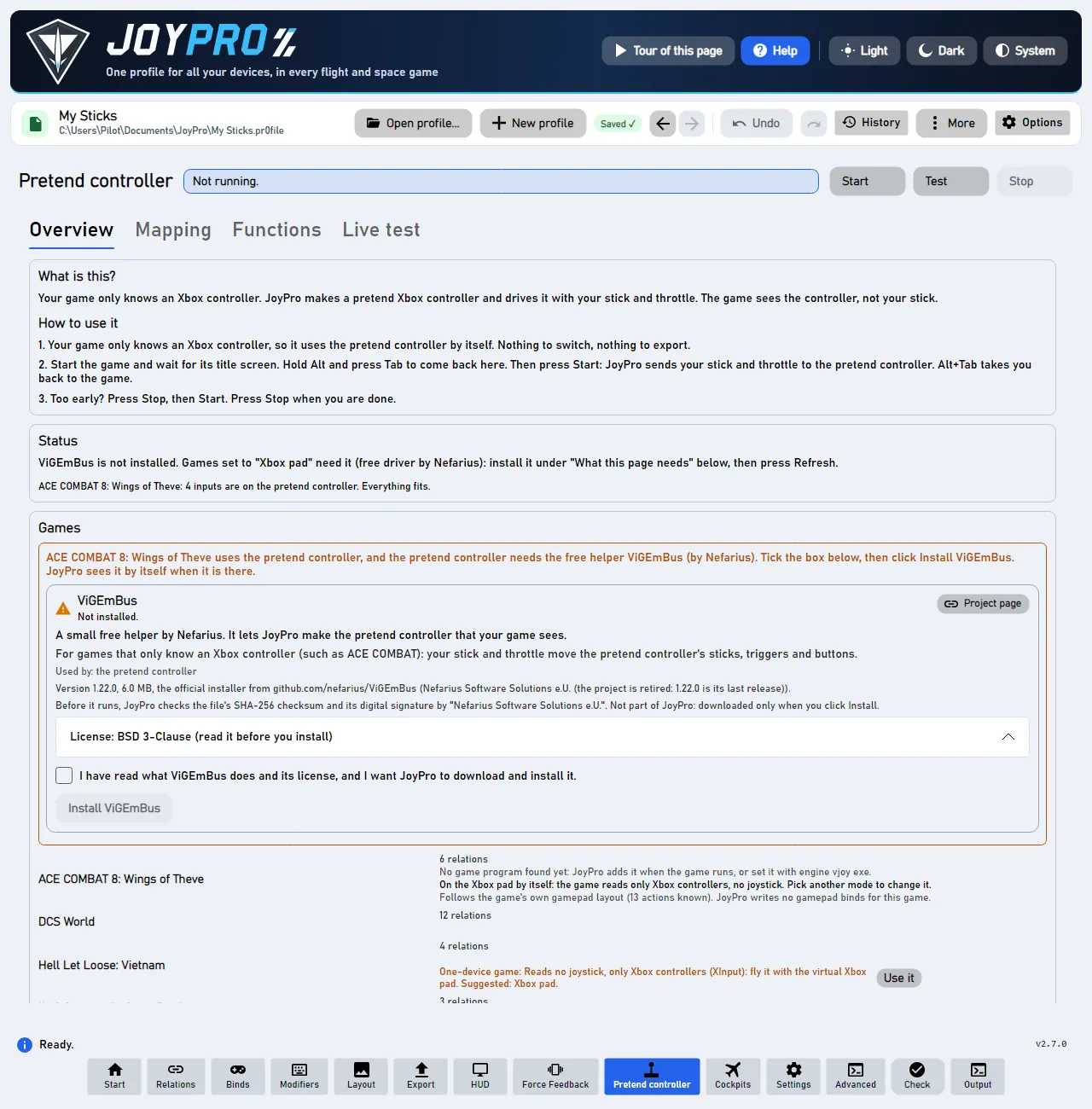
You do not need to switch anything. JoyPro puts these games on the pretend controller by itself. The page says "On the Xbox pad by itself: the game reads only Xbox controllers". Nothing is written into the game.
#Every time you play
- Start the game
wait for its title screen - Alt+Tab
back to JoyPro - Start
the pretend controller is on - Alt+Tab
back to the game
- Start the game. Wait until it shows its title screen.
- Hold Alt and press Tab. You are back in JoyPro.
- Press Start.
- Press Alt+Tab again. You are back in the game. Fly!
- When you are done, press Stop.
Press Start only when the game shows its title screen. Too early? JoyPro says "Too early". Press Stop, then Start. Do this every time you play.
#What goes where in ACE COMBAT 8
| On your HOTAS | On the pretend controller | In the game |
|---|---|---|
| Stick forward, back, left, right | Left stick | Pitch and roll |
| Throttle lever | Forward: RT. Back: LT. | Speed up and slow down |
| Stick twist (or the pedals) | LB and RB, from about 30 % | Yaw left and right |
| A free hat on your stick | Right stick | Look around |
| Your flare button | L3 and R3 together | Flares (not confirmed in game yet) |
| Your comm switch or AI-menu hat | D-pad | Wingman orders |
| A button relation named "High-G" | Both triggers fully | High-G turn |
The list on the Live test tab says what each button does, for example "A: Fire machine gun".
JoyPro presses L3 and R3 together for flares. Nobody has confirmed this in the game yet. JoyPro says so too.
#Something does not work?
- The game does not react. Was Start pressed too early? Press Stop, then Start.
- The nose goes the wrong way. Did you set "Pitch Controls: Inverted" in the game? Then switch this web page to Advanced with the Show: switch at the top.
- No ViGEmBus. Without it, the game cannot see your stick. Install it on the Virtual Joystick page.
More about the games: ACE COMBAT, Hell Let Loose: Vietnam.
#Details
- No HidHide for these games. They read only Xbox controllers, so they never see your real sticks. Nothing has to be hidden. HidHide is only for games set to vJoy.
- The mode switches itself. While you have not picked a mode, these games use the Xbox pad. Pick another mode on the Virtual Joystick page, and JoyPro keeps your choice.
- Your curve reaches the pad. The dead zone, saturation, curve and invert of Axis response (Binds page) are applied to the pad stick or trigger. Tick only ACE COMBAT 8 under Applies to for a curve of its own.
- Pitch. DCS's invert never reaches the pad. By default a stick pushed forward gives nose down. With "Pitch Controls: Inverted" in the game, untick Invert for ACE COMBAT 8 alone (Axis response, Applies to: ACE COMBAT 8).
- Look around on a hat. With no axis on the look actions, a free hat of your stick drives the right stick. A hat direction holds the stick out while you hold it. The hat keeps its job in other games (trim in DCS).
- High-G turn. A button relation named "High-G" holds both triggers. So does the relation with DCS's ASC Direct Control (the "Cobra button" of the Su-27, Su-33, J-11A). The throttle on the triggers keeps working.
- Several games on the pad. ACE COMBAT 7 and 8 can both use it, each with its own table. With auto start the running game's table goes live. Else pick it under Xbox pad table for Start and Test.
- Auto start makes the pad within about 3 seconds of the game's start, before its title screen. That can be too early for these games: then press Stop and Start at the title screen.
- Experts. vJoy, HidHide, the forwarding rate and the modes are under Show details for experts (vJoy, HidHide, modes).
- ACE COMBAT 7 reads sticks itself. It gets a normal export of its
Input.ini(ACE COMBAT).
#Behind the pretend controller
- A game that reads no joystick at all has
MaxJoysticks0 and the suggested mode xbox; without a stored choice its mode is xbox (VJoySettings.ModeOf).engine vjoy modestores a choice. - The planner pins each relation's input to the pad control the game's own layout uses (
DB\<Game>\actions.tsv, 5th column). The pad's own functions (throttle split, yaw buttons, flare chord, D-pad, High-G, look hat) come fromengine/VJoy/XboxPadAutoSetup.csand are made again at every plan. JoyPro.VJoy run --xbox-sink vigemcreates the pad; Test uses--xbox-sink dryand changes nothing.engine vjoy pad-checkreports what a profile reaches on the pad, with a score. Reference: Virtual joystick.