
MSFS 2020 keeps one control profile per device, used for every aircraft. In the Steam version each profile is a small
XML file in Steam's remote folder of the sim; JoyPro reads these files into your profile and writes your binds back
into them, in place. The Microsoft Store version's profiles are imported, not written. Unlike
MSFS 2024 there is no preset package, no import file and no profile per aircraft.
Microsoft Flight Simulator 2020 native (its own bind files)
- Support
- native (its own bind files)
- Engine command
engine msfs2020- Bind file
- Steam
userdata\<id>\1250410\remote\inputprofile_*(XML fragment per device) - Inputs the game reads
- reads 8 axes, 1 hat (4 directions) per joystick (documented)
- Command list from
- as MSFS 2024
- In-game test
- 41/41 steps passed (2026-10-10)
- ✓ Import
- ✓ Export
- ✗ Keyboard binds
- ◐ ModifiersMSFS: modifier buttons of the same device only.
- ✓ Command list built on your PC
- ✓ Game watcher
- ✓ Axis curves and dead zones
- ✗ Game control settings
- ✗ In-game force feedback settings
- ✗ Force feedback from telemetry
- ✓ Telemetry recording
- ✓ Virtual joystick (vJoy)
- ◐ Virtual Xbox pad
- ✓ Virtual functions
- ✓ Setup wizard / Auto Assign
- ✓ Cockpits
- ✓ Cheat sheets
- ✓ In-game test
From the support matrix, generated from the engine’s code: all games.
#Get it working in 3 steps
- Set it all up for me
on the Start page - Use these buttons
look at the list first - Write to my game
keep the sim closed
Before: make a profile for each device once in the sim (Settings > Controls). JoyPro writes the Steam version only; the Microsoft Store version can only be imported.
Then: start the sim. Your binds are in Settings > Controls, in every aircraft.
Did you bind buttons in MSFS 2020 before? Then the Start page offers Import, then fill the gaps. Your binds stay, and only free buttons get new jobs. See Quick start: make my stick work.
#What JoyPro does for MSFS 2020
- Import: the profile of each connected device (Steam or Microsoft Store) comes into your profile: flight binds, General binds (cameras, views, pause) and the axis settings of the Sensitivity page.
- Relations: one relation is one function. A relation applies to every aircraft, because MSFS 2020 has one profile per device.
- Export: JoyPro edits the device profiles in the Steam version's
remotefolder. The sim reads them at its next start.
#Import your MSFS 2020 binds
- Open Start and press Import on the Microsoft Flight Simulator 2020 card.
- Also import devices that are not connected (off): MSFS keeps the profiles of every device it ever saw; off means only the devices connected now. Also import default presets the sim may not use (off) adds the preset the sim ships for a device without a profile of its own, also when it is not known whether the sim uses it.
- Press Import now, or Look first to see what the sim has without changing your profile.
#Build and check relations
Build relations on the Relations page as for every game (see the relations flow), then run the Check on the Export page. The Check does not report a plane's throttle and a helicopter's collective on one axis as an error here: MSFS 2020 has no separate aircraft lists.
#Export to MSFS 2020
- Close MSFS 2020. JoyPro refuses to write while the sim runs.
- Open Export, keep Replace on my devices with Also clear my other devices if JoyPro is where you set up your devices, and press Export now on the MSFS 2020 card.
- Start the sim. The
remotefolder is a Steam Cloud folder, so Steam syncs the changed files.
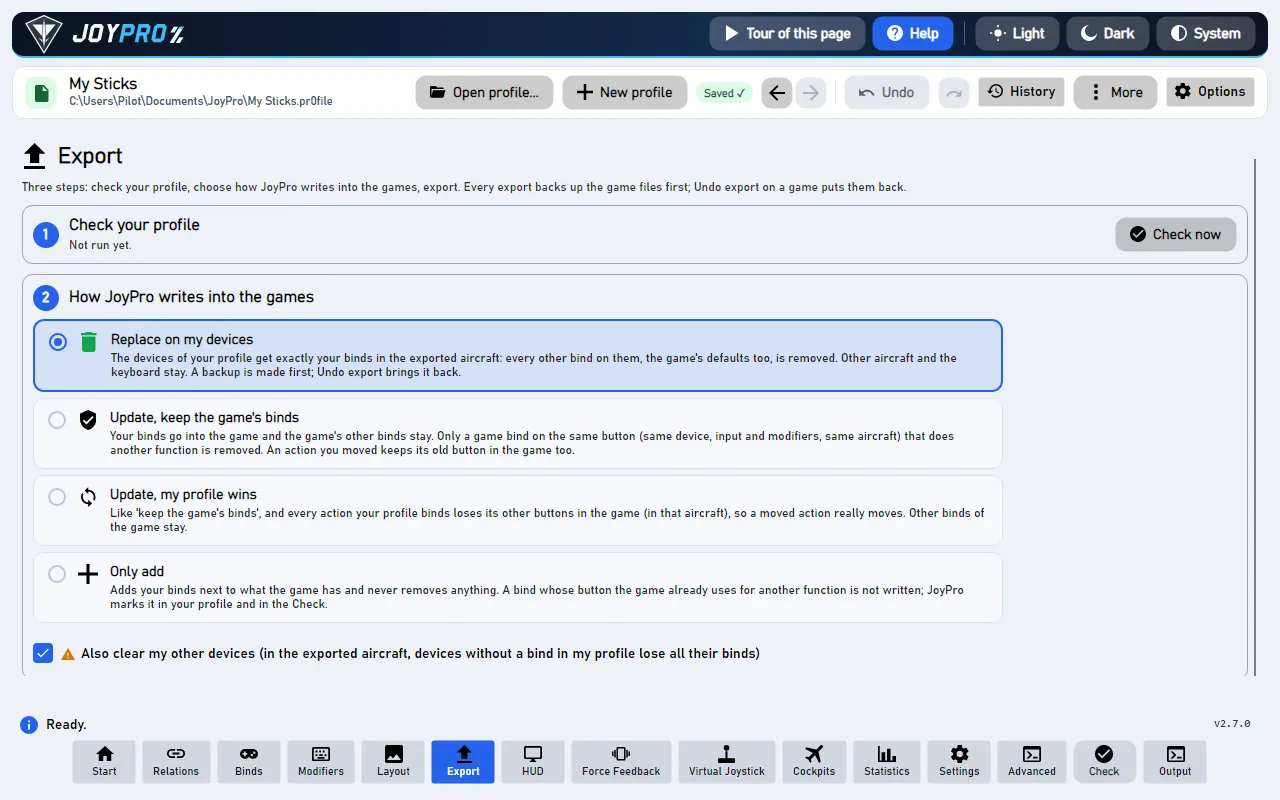
Open Settings > Controls and pick your device: your binds are in the device's profile under the sim's action names, and the device's Sensitivity page shows the axis curves JoyPro wrote. The same profile is used in every aircraft.
#What you do yourself in MSFS 2020
- Make a profile for each device once in the sim (Settings > Controls). JoyPro edits existing profiles only; for a device without one the export says "create one in the sim first".
- Microsoft Store version: JoyPro imports your profiles but cannot write them. Use the Steam version for the export, or set the binds in the sim.
- Relations limited to aircraft: MSFS 2020 cannot keep them apart. In the Other Games form on the Start page, Export Aircraft exports the relations limited to one aircraft too, for every aircraft.
#Common pitfalls
- "MSFS 2020 is running": close the sim and export again.
- The sim shows your old binds: Steam Cloud put an older copy back. Close the sim and export again.
- A device has several profiles: JoyPro uses the one picked with Game Profile in the Other Games form, or the only one; otherwise the device is skipped with a warning that lists the names.
- A bind is missing: an action keeps at most two input combinations (Primary and Secondary); a third is reported and left out.
#Files JoyPro reads and writes
| File | What it is |
|---|---|
<Steam>\userdata\<id>\1250410\remote\inputprofile_<n> |
one device profile, XML without extension; written in place (backup .jpbak first) |
<Steam>\userdata\<id>\1250410\remote\profile_00 |
the sim's binary index of the device profiles: read only, never written |
%LOCALAPPDATA%\Packages\Microsoft.FlightSimulator_8wekyb3d8bbwe\SystemAppData\wgs\<user>\ |
the Microsoft Store save: read only (import and scan) |
<install>\Input\*.xml, the fs-base\en-US.locPak |
the presets the sim ships and its menu names: read only |
%LOCALAPPDATA%\JoyPro2\Ownership\MSFS, ...\Backups\MSFS |
JoyPro's ownership data and backups, never in the Steam folder |
The Steam remote folder is a Steam Cloud folder. Only existing inputprofile_* files are edited: the sim's
profile_00 names specific files, so a new file would not be picked up.
#The export modes in MSFS 2020
| Mode | What happens in the device profiles |
|---|---|
| Only add | A bind is written only where the profile has no other action on that input combination; otherwise it is listed under "Binds Not Written, Button Taken In The Game". Nothing is removed. |
| Update, keep the game's binds | The other action on your combination loses it; everything else stays, also an action's old combination. |
| Update, my profile wins | As above, and every action you bind loses its other combinations in the profiles of connected devices. |
| Replace on my devices | The profiles of the connected devices JoyPro binds keep only your binds. |
| + Also clear my other devices | The profiles of connected devices without a bind in your profile are cleared. |
#What is never touched
- The menu, world map and developer contexts (
MENU,MENU_*,WORLDMAP_*,DEBUG,DEVMODE*,EDITOR_*,MISSION_FLOW_TOOLS), in every mode. - Keyboard, mouse and gamepad profiles (
GUID="{0}"): keyboard binds are not written in MSFS. - Profiles of devices that are not connected,
profile_00, the Store save, the import's ignored devices and the vJoy device JoyPro tunnels into.
#Curves and the rest
- Granularity: one profile per device, for every aircraft.
- Axis curves: the device's Sensitivity page, one set per physical axis: Sensitivity + and -, Neutral, Dead zone,
Extremity dead zone, Reactivity, the no-curve flag and invert. MSFS 2020 has no per-action override: a relation that
asks for one gets the device page and a warning. The curve preview matches the sim (measured in MSFS 2020). The
tuning scope
family:msfscovers both sims; see axis-curves. - Force feedback: MSFS has none of its own.
- Telemetry recording: through SimConnect, read only, with the
SimConnect.dllin the sim's install folder (or the MSFS SDK's; JoyPro ships none). - HUD: the HUD finds the sim by its process (
FlightSimulator) and shows its binds. - Watcher: JoyPro watches the
inputprofile_*files and the Store save'scontainers.indexand asks after the sim closed (the watcher).
#What differs from MSFS 2024
| MSFS 2020 | MSFS 2024 | |
|---|---|---|
| Export target | the Steam profiles in place | your own profiles (Steam and Store), JoyPro's preset package, import files |
| Microsoft Store version | imported only | imported and written |
| Profiles | one per device | per device and category, chosen per aircraft |
| Relations limited to aircraft | only with Export Aircraft (then for all aircraft) | written into the profiles of those aircraft |
| Action list in a profile | only bound actions | every action of its contexts |
| Per-action axis override | no | yes |
#Inside the MSFS 2020 integration
flowchart LR
  P["Your profile<br/>(relations + binds)"] --> E["engine msfs2020 export"]
  E --> R["Steam remote /<br/>inputprofile_n<br/>(one per device)"]
  R --> C["Steam Cloud<br/>(next sync)"]
  R --> G["MSFS 2020:<br/>Settings > Controls"]
Code: engine\Games\MsfsIntegration.cs (one class for both sims, sim == 2020), MsfsProfileFile.cs (the
line-based editor), MsfsUserProfiles.cs (Steam and Store reading), MsfsSimDefaults.cs, MsfsGameData.cs,
MsfsAircraft.cs, engine\AxisModels\Msfs.cs.
- Format: an XML fragment (read with fragment conformance):
<Version>,<FriendlyName>,<Device DeviceName GUID ProductID>,<Axes>with<Axis AxisName AxisSensitivy AxisDeadZone ...>(the misspelled attribute names are the sim's),<Context ContextName>/<Action ActionName Flag>/<Primary>/<Secondary>/<KEY Information>code</KEY>. A released action is removed; a new action goes into the context it has in the folder's other profiles, else its catalog context, elsePLANE(with a warning). - Devices:
GUIDis the DirectInput instance GUID, so reading needs no connected device;ProductIDis the decimal USB product ID. Codes: button N = N-1, hat 256-259, axes 1026/1042/1058, 770/786/802, sliders 514/530; the last KEY of a combination is the main input, other buttons of the same device are modifiers. - Command list:
engine msfs2020 refresh-dbreads the sim's presets (<install>\Input, its official packages) and every flight eventen-US.locPaknames; it shares its start with MSFS 2024's list. - Commands:
engine msfs2020 paths,engine msfs2020 catalog,engine msfs2020 scan,engine msfs2020 import(--game-profile,--include-disconnected,--include-sim-defaults),engine msfs2020 export(--mode,--nuke-untouched-devices,--dry-run,--aircraft <key>); Undo withengine backups restore. - Old profiles: profiles saved when JoyPro had one MSFS game (
MSFS:<action>) get a node for each sim when they are loaded.
#Known limits
- The Microsoft Store version is read only; an export with its save folder as the path is refused.
- New
inputprofile_*files are not created; a device needs a profile made in the sim. - Steam Cloud can put an older profile back.
- Half axes, hat diagonals and a second hat are not read or written; at most two combinations per action.
- The shipped presets of MSFS 2020 were not checked on a real install, so a 2020 preset must also carry the device's name to be taken as a default.
- Tests:
engine\tests\smoke\msfs.ps1(Sensitivity page, overrides, flags, conflicts, merge); in the simtools\e2e\games\MsfsCurves.ps1(binds, the Sensitivity page, buttons and axis curves in a flight, read back through SimConnect).
All technical notes on this game (generated from the repository): msfs.md.