
A relation is one function, for example "Gear Up/Down" or "Throttle". It holds that function's action in every game and aircraft you fly: DCS F-16C "Landing Gear Up/Down", IL-2 "Gear", War Thunder "Landing gear", Star Citizen "Toggle landing gear". You give the relation a button or axis on the Binds page (or several, for example the same button on two sticks), and that button then does the same function everywhere.
Input 1: Throttle button 22 (hold Shift)
Input 2: Stick button 5
Each game gets the same inputs for its own action. Export writes them into each game's own control files, with a backup first. A game that keeps fewer inputs per action (Elite Dangerous keeps two buttons, most games one axis) gets as many as it keeps, and Export tells you which one did not fit.
| Game | Its action | Your inputs | Where Export writes it |
|---|---|---|---|
| DCS (F-16C, F/A-18C, A-10C) | Landing Gear Up/Down | Throttle button 22 with Shift, Stick button 5 | The controls of each aircraft in DCS's Saved Games folder |
| IL-2 Korea | Gear | the same | IL-2 Korea's key mapping |
| War Thunder | Landing gear | the same | War Thunder's controls file |
#Relations in plain words
Think of a relation as a label for a job: "put the gear down". Each game calls that job something else and stores it under its own code. The relation collects them all, so you decide once which button does the job.
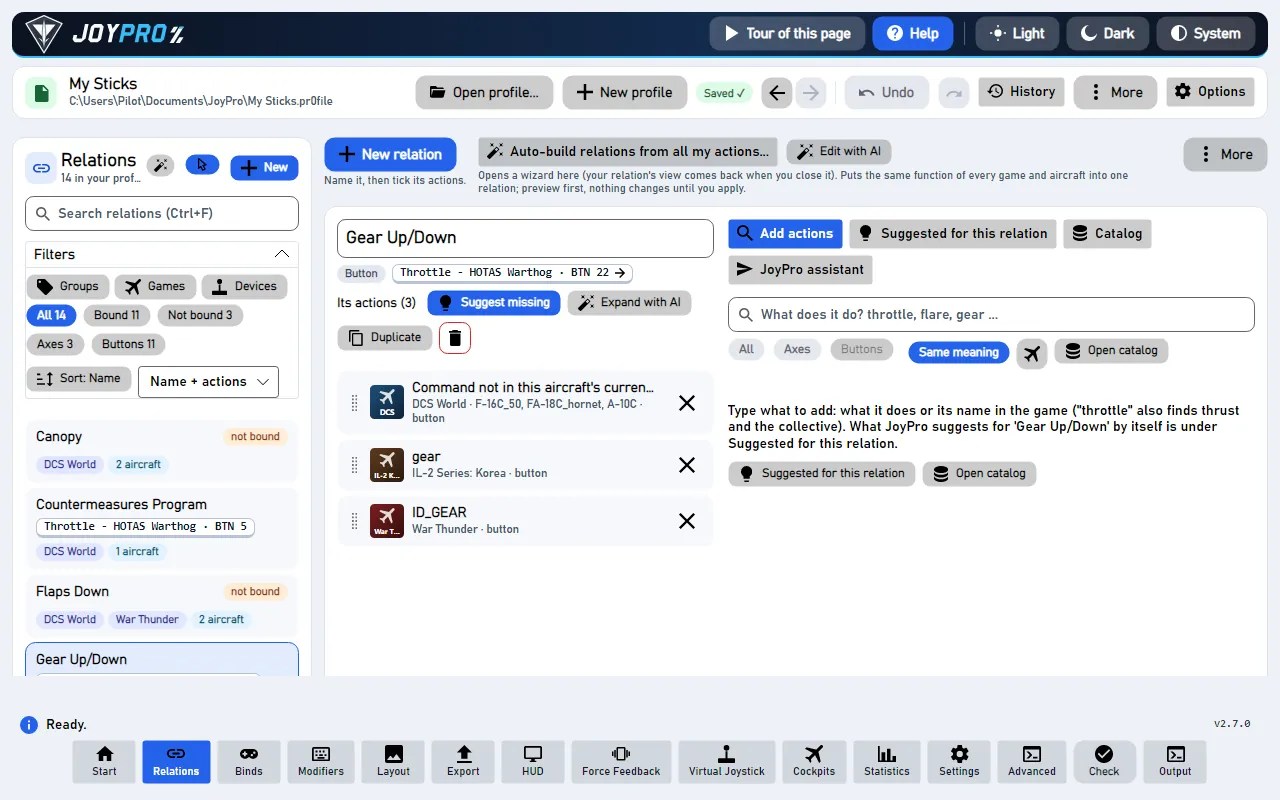
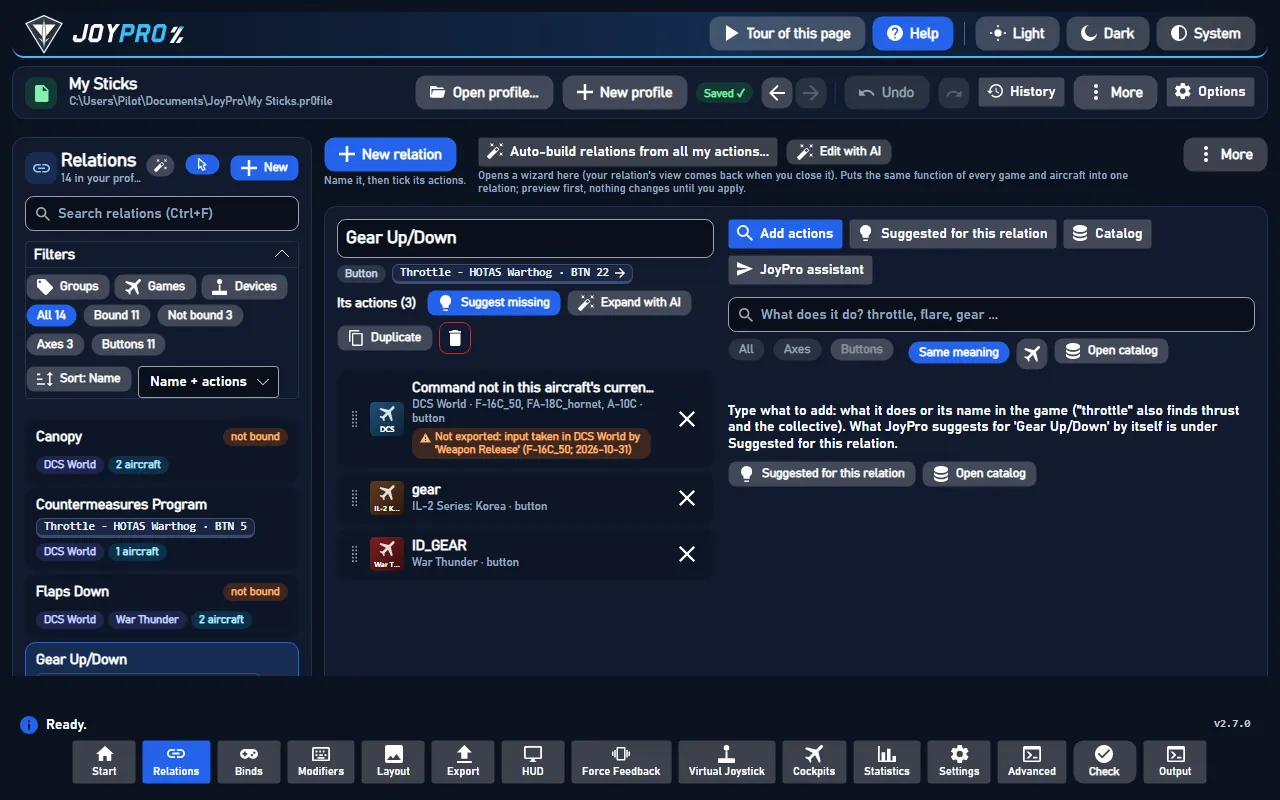
- Relations page: the list of your relations on the left, the open relation in the middle, tools on the right.
- Binds page: which button or axis each relation is on. A relation can be on several.
- Export: writes it into every game.
#Make one, step by step
- Press New relation (or Ctrl+N) and type a name, for example
Gear. - Under Add actions, type what it does:
gear. JoyPro searches every game and aircraft while you type and knows other words for the same thing (throttlealso finds thrust and the helicopter collective,flarethe countermeasure dispense switch). - The results come grouped by game. Each game's main control of the function comes first. Tick what belongs.
- Press Create relation with n actions. Done: open the Binds page and press the button you want for it.
#Let JoyPro do it
- Suggested for this relation lists what else means the same in other games and aircraft. Add one or Add all.
- Auto-build relations from all my actions... builds relations for the whole profile: the same function of every aircraft and game together (By function, called Auto Group). You see a preview first.
- JoyPro assistant: type a sentence like "make a throttle relation for every game" and it does it. Undo this takes the whole answer back.
Every change can be undone with Ctrl+Z, also after a restart.
#Working with many relations
- Filters above the list: groups, games and their aircraft, devices, bound or not, axis or button. The search can look at names only, names and actions, or everything (remembered). Ctrl/Shift+click ticks several relations for Bulk changes (groups, duplicate, delete).
- The open relation: rename in place (Enter), its kind (Axis or Button), its input, the function chip (what JoyPro thinks the relation is, from its function catalog), Suggest missing (n), Duplicate (with or without the bind), delete. Below, Its actions: one card per game action with the game badge, the aircraft, the title. Drag a card by its grip to change the order (or Alt+Up / Alt+Down).
- Aircraft of an action (DCS): a click on an action opens its aircraft, "82 of 84 aircraft", each with a tick.
The same DCS command id can mean something else in another aircraft (
a2001cdnilis "Pitch" in jets and "Cyclic Pitch" in helicopters; a cockpit switch id is three different switches in three warbirds): JoyPro adds only aircraft where the id means the same and flags the others. - Suggestions come from four sources, without any AI: the function catalog (checked against the manuals), your own style (what you put on this function in other aircraft), the same DCS id where it means the same, and similar titles in any game (never the opposite direction). High from 85 points, medium from 55; weak ones only on request. x dismisses a suggestion for good (kept in the relation switched off, so it never comes back).
- Already in another relation: a row says "Already in 'Flare'" and offers Move here.
- Catalog: every action of a game or aircraft by its categories, for browsing instead of searching.
- Auto Group works for DCS, Falcon BMS, IL-2 Great Battles and Korea, Star Citizen, X4, Elite Dangerous, MSFS 2020 and 2024, X-Plane 11 and 12, War Thunder, Arma 3, Arma Reforger and WARDOGS. Group by description groups only what a sentence names ("all radio and comms functions of the F-16 and the A-10").
#Several inputs for one relation
A relation can be on more than one input: the same function on two sticks, or a second fire button. Each input has its own device, modifiers and axis curve. Input 1 is the main input.
- Add one: Binds page, the relation, More inputs > Record another input (or Add the input picked by hand). Make main swaps it with the main input; Remove takes it off.
- One curve per input: for an axis on two devices, Axis response has an Input list at the top.
- A whole device: Copy every bind of a device to another device gives every bind of the first device the matching input of the second one (the same grip on two bases).
- Found by any input: Follow input, the Layout page, the Devices filter and the search with Everything find a relation by its second input too.
- In the games: where a game keeps several inputs per action, Export writes all of them, the main one first. Where it keeps one, it writes the main input and names the rest.
#Several actions at once
In the open relation, Ctrl+click or Shift+click action cards; Ctrl+A selects all. The bar "n actions selected" offers:
| Button | What it does |
|---|---|
| Copy (Ctrl+C) | Then open another relation of the same kind and press Paste (Ctrl+V). The actions come with their aircraft, also the switched-off ones. |
| Move to... | New relation (type a name; same kind as the old one) or Existing relation, picked from a list you can search. Only relations of the same kind are listed. |
| Remove (Del) | Takes them out after one question. |
The right-click menu of an action has Copy and Move to another relation... too. In the list of relations, select several relations (Ctrl/Shift+click) and press Move actions to...: all their actions go to one relation, new or existing, and the emptied relations are deleted. Each of these is one step: one Ctrl+Z takes it back. More: Several buttons for one function.
#What the Check looks at
Two relations with the same input that both have an action of the same aircraft switched on mean one button does two things there; one action on in two relations means the game gets it on two buttons. The Check lists both with one-click fixes.
A relation itself changes nothing in a game. At the next export every action of the relation gets the relation's inputs, in each game and aircraft where the action is switched on:
- DCS: in every ticked aircraft the command gets the button (with the modifier when the bind has one). An aircraft switched off in the action keeps whatever it had (or nothing, with Replace).
- IL-2, BMS, X-Plane, MSFS, War Thunder ...: one action per game; it gets the button.
- Star Citizen and games with infantry: only the ship or aircraft action gets the button; on-foot binds stay.
- Axis relations carry the curve, dead zone, saturation, invert and slider of the bind, written in each game's own response model (DCS curvature, IL-2 response, MSFS sensitivity, X-Plane response curve ...).
So after one export, "Throttle · BTN 22" lowers the gear in the F-16, the F/A-18, the A-10C, IL-2 Korea and War Thunder, and the player finds the same switch for the same job in every cockpit.
#How it works inside
- Data model (
engine\CoreRelation.cs,CoreProfile.cs): a.pr0fileholdsRelationobjects; each has a name, groups,IsAxis, a list ofRelationItem(game, id, aircraft with on/off state, order) and aBind(device, input, modifiers, axis tuning per scope). Modifiers are separate objects referenced by name. The profile is saved atomically and versioned (ProfileHistory.cs). - Search (
engine relations search): one index over every game's command list (DB\<game>in the game-data folder), the function catalogDB\Functions(functions, synonyms, game terms, checked against manuals) and per-id meanings (EngineIdMeanings.cs: same / near / differs per DCS aircraft). The GUI runs it 300 ms after the last key; quick commands go to one long-runningengine serve(the engine server) instead of a new process each. - Changes:
relations add <name> --axis|--button --node Game:Id:Plane1|Plane2,relations suggest apply <relation> --add ... | --take | --never | --remove,relations rename,relations item move,relations aircraft set. Each is one engine command, so one undo step. - Suggestions:
relations suggest <relation> [--min high|medium|low](scores as above);relations suggest --all --missingfor every relation at once. - Auto Group: deterministic rules plus the learned style (at least two separate decisions in your own relations); preview, then apply. The optional local AI model only calls the same tools; without it the offline rules answer.
What happens when you search, create a relation and get suggestions. The Relations page asks the engine server:
| # | Who | What happens |
|---|---|---|
| 1 | You | Type "gear" into the search. |
| 2 | Engine server | relations search "gear" --limit 200 --per-game 12 answers with rows by game, the main control first, and why each was found. |
| 3 | You | Tick rows and press Create relation. |
| 4 | Engine server | relations add "Gear" --button --node DCS:d68...:F-16C_50|FA-18C_hornet --node WarThunder:ID_GEAR:WarThunder saves the profile with a history version. |
| 5 | Engine server | relations suggest "Gear" answers with suggestions, their scores and reasons. |
Engine commands: engine relations search, engine relations add, engine relations suggest,
engine relations browse, engine relations assistant, engine relations auto-group, engine relations from-text.
Docs: Relations page reference, Auto Group,
Group by description, Suggest additions.
#Related
- The Relations page, every control on it
- The Binds page: give the relation its button
- Modifiers: one button changes what others do