#Expand all
ButtonwrittenOpens every section and card of the list.
Source CheckProblemsPanel.axaml:77 · ExpandAllCheckCardsCommand in MainWindowViewModel.Duplicates.cs
 JoyPro2
Check in the bottom bar runs the profile check and shows the results on the Export page under Problems found by the check. What each kind of card means and how the fixes work: The Check.
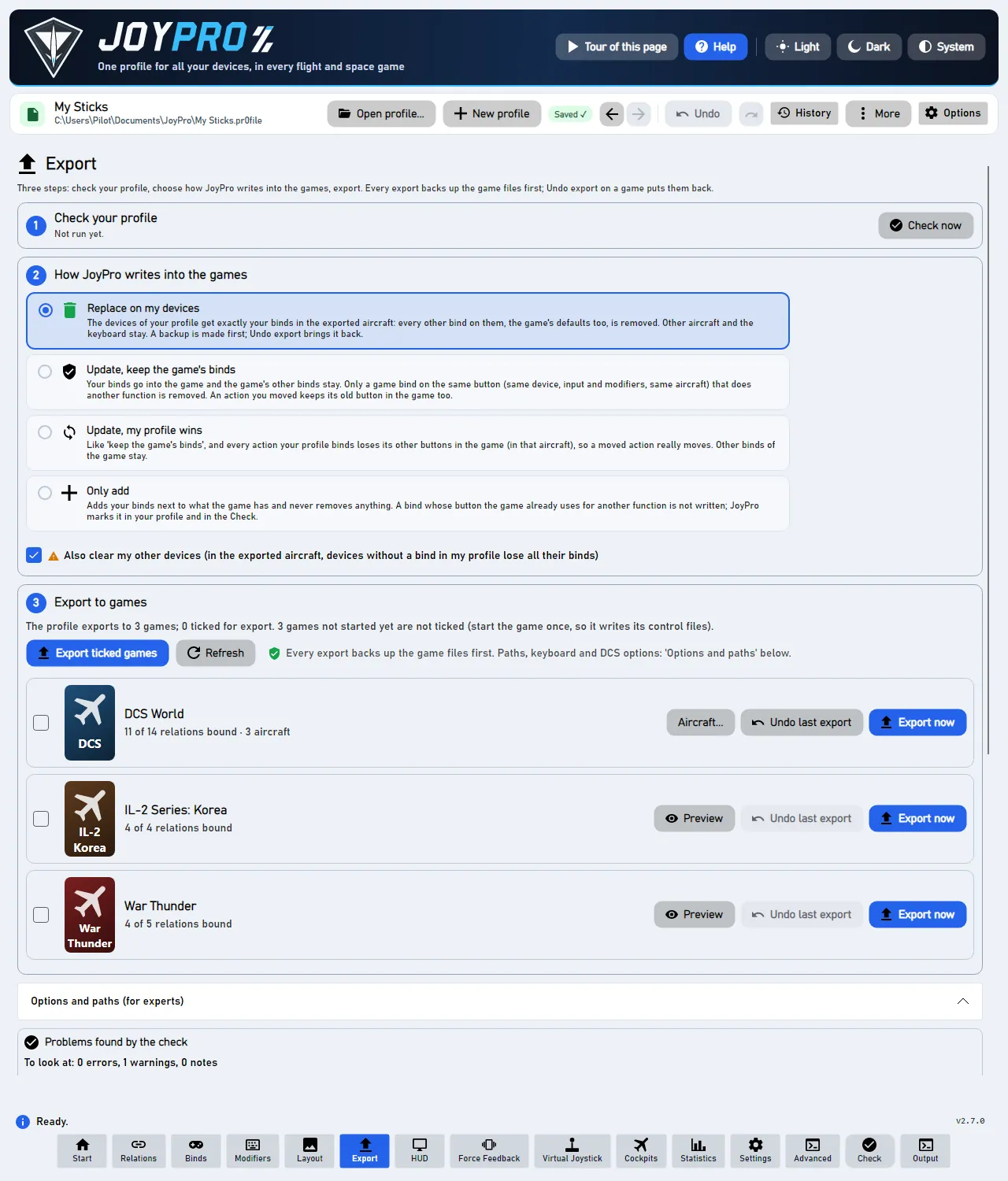
Fix all with a rule applies one rule to every card of a section, Fix with AI takes an instruction in plain words; both show a Preview with a tick per change, Apply the ticked ones applies them as one undo step. Also right after imports and take-overs runs the sure fixes automatically after an import.
Views/Controls/CheckProblemsPanel.axaml, ViewModels/MainWindowViewModel.CheckCards.cs,
MainWindowViewModel.Duplicates.cs, Models/CheckIssueModels.cs. Engine: engine profile validate,
engine relations conflicts, engine relations duplicates, engine export-marks list.
The feature documentation behind this page, generated from the repository:
22 controls, read from the program’s source: 22 written, 0 with the facts from the source (tooltip, code comment, engine call), 0 still to be expanded.
Opens every section and card of the list.
Source CheckProblemsPanel.axaml:77 · ExpandAllCheckCardsCommand in MainWindowViewModel.Duplicates.cs
Closes every section, so only the section titles with their counts show.
Source CheckProblemsPanel.axaml:78 · CollapseAllCheckCardsCommand in MainWindowViewModel.Duplicates.cs
"Ignored warnings (n)": opens or closes the list of the warnings you ignored with Ignore on their card. It shows
only while there are some. Each one is described with the card's words (the buttons with their relations, the aircraft
and the command) and has Show again, which puts the card back on the check (one Ctrl+Z takes it back). The search
above filters the list as well; searching for "ignore list", "hidden warnings", "dismissed" or "muted" opens it. An
ignored warning also comes back on its own when one more button, relation or command joins it: the card then says
"Shown again: now also on ..." and is marked New. Engine: engine relations duplicates --list-kept,
engine relations conflicts --list-kept, --forget-kept --keys.
Source CheckProblemsPanel.axaml:80 · ToggleIgnoredWarningsCommand in MainWindowViewModel.CheckIgnored.cs · setting IsIgnoredWarningsOpen
Tooltip Every ignored warning comes back on the check; the binds do not change. Ctrl+Z undoes it.
Puts every ignored warning back on the check at once; the binds do not change. One engine command, so one Ctrl+Z
hides them all again. Engine: engine relations duplicates --forget-kept.
From the code "Show all again": every ignored warning (the engine forgets the conflicts' too; one undo step).
Engine engine relations duplicates · engine profile validate
Source CheckProblemsPanel.axaml:96 · ShowAllIgnoredAgainCommand in MainWindowViewModel.CheckIgnored.cs
"Show all n" / "Show fewer": the table "aircraft -> command" of a card shows its first rows; this opens the rest or folds them again.
Source CheckProblemsPanel.axaml:136 · ToggleRowsCommand
A fix of a card (the blue one with the tick is JoyPro's suggestion) or an Open '
Ignore (on "Same command on two buttons", "One button does two things" and "One button runs two commands"; it was called "Keep both" before 2.6.1) changes no bind: the card goes away and JoyPro remembers it in the profile. It comes back when the command lands on one more button (one more relation on the button, one more command in the relation), marked "Shown again: now also on ...". In the list Ignored warnings, Show again puts one card back.
On "Same command on two buttons", Replace '...' on is for the case where one button should do something else (the [Dec] that should be [Inc]): the relation opens with Add actions searching for the command's name and its aircraft as the filter. Tick the action that belongs there and press Replace with the ticked: it takes the old command's place for those aircraft in one step (one Ctrl+Z).
Source CheckProblemsPanel.axaml:140 · Command
"Fix the sure ones (n of m at 90% or more)": shows a preview of JoyPro's suggested fix for every action on in several
relations that it is at least as sure about as the slider above says. Nothing changes yet; tick the lines you want and
press Apply the ticked ones (one undo step). Engine: engine relations duplicates
--rule suggested --min-confidence.
Engine engine relations duplicates
Source CheckProblemsPanel.axaml:163 · PreviewSureDuplicatesCommand in MainWindowViewModel.Duplicates.cs
Tooltip When an import or a take-over puts an action into a second relation, JoyPro fixes it at once if it is at least this sure; the rest stays here for you.
Off by default: when an import or a take-over of game changes puts an action into a second relation, JoyPro applies its suggested fix at once if it is at least as sure as the slider says; the rest stays on the check for you. The import's notice says how many were fixed (Ctrl+Z undoes it). Saved in JoyPro's settings.
From the code Fix the sure ones right after imports and take-overs (Settings: saved, off at first).
Source CheckProblemsPanel.axaml:168 · AutoFixDuplicatesAfterImport in MainWindowViewModel.Duplicates.cs · setting AutoFixDuplicatesAfterImport
Opens the rule panel: one rule for every card of the section; Preview lists each change with a tick before anything happens.
Source CheckProblemsPanel.axaml:171 · ToggleDuplicateRuleCommand in MainWindowViewModel.Duplicates.cs · setting IsDuplicateRuleOpen
Opens the box Fix with AI (and closes Fix all with a rule): describe in a sentence where the actions of "actions on in several relations" belong, for example "keep trim functions in the Trim relations, everything else in the Mode Button relations". JoyPro reads simple sentences itself; the optional local AI only helps with the rest. Nothing changes until you preview and apply.
Source CheckProblemsPanel.axaml:172 · ToggleDuplicateAiCommand in MainWindowViewModel.Duplicates.cs · setting IsDuplicateAiOpen
Shows what the chosen rule would change (a rule such as "keep it on the device ..." or "keep it in the relations named
..."), as a list of ticked lines "F-16C 'Trim Up': keep in 'Trim', off in 'Hat Up'" with how sure JoyPro is. Changes
nothing. Engine: engine relations duplicates --rule.
Engine engine relations duplicates
Source CheckProblemsPanel.axaml:192 · PreviewDuplicateRuleCommand in MainWindowViewModel.Duplicates.cs
Shows what your sentence would change, with "Understood: ..." and "Not understood: ..." lines so you see how JoyPro
read it. Changes nothing. Engine: engine relations duplicates --instruction ... --llm auto (the local AI is used
only when it is switched on in Settings > Local AI).
Engine engine relations duplicates
Source CheckProblemsPanel.axaml:200 · PreviewDuplicateInstructionCommand in MainWindowViewModel.Duplicates.cs
One change of the preview. Untick the lines you do not want; Apply the ticked ones applies only the ticked lines.
Source CheckProblemsPanel.axaml:216 · IsTicked in CheckIssueModels.cs · setting IsTicked
Tooltip One version of your profile; Ctrl+Z takes all of it back
Applies the ticked changes of the preview in one engine command, so one Ctrl+Z takes them all back. In the game: after the next export each fixed button does one thing.
Engine engine relations duplicates · engine profile validate
Source CheckProblemsPanel.axaml:225 · ApplyDuplicatePreviewCommand in MainWindowViewModel.Duplicates.cs
Ticks every line of the preview, or unticks all of them when all are ticked already.
Source CheckProblemsPanel.axaml:227 · TickAllDuplicatePreviewCommand in MainWindowViewModel.Duplicates.cs
Closes the preview without changing anything.
Source CheckProblemsPanel.axaml:228 · CancelDuplicatePreviewCommand in MainWindowViewModel.Duplicates.cs
Tooltip Opens one of the relations with the actions of this card marked; Back returns here.
On a card whose actions are in more than two relations: a menu of those relations. Pick one to open it on the Relations page with the card's actions marked; Back (Alt+Left) returns to the card.
Source CheckProblemsPanel.axaml:269
The arrow at the top right of a card: folds the card to its title or opens it again with the buttons, the sentence, the table and the fixes. Expand all / Collapse all do it for every card.
Source CheckProblemsPanel.axaml:307 · IsExpanded in CheckIssueModels.cs · setting IsExpanded
Tooltip More ways to fix it
The other fixes of the card: switch it off on both buttons, move to another button, remove an unknown command, find similar commands.
Source CheckProblemsPanel.axaml:370
Opens the card's details: how sure JoyPro is about the suggestion and why, and where an unknown command came from (the module version, the import). Built only while open, so a page with many cards stays fast.
Source CheckProblemsPanel.axaml:394 · IsDetailsOpen in CheckIssueModels.cs · setting IsDetailsOpen
"Show n more (m not shown yet)": a section with many cards shows one page of them at first, so the page stays fast; this adds the next page. The search finds every card, shown or not.
Source CheckProblemsPanel.axaml:426 · ShowMoreCommand
Tooltip Looks for relations without binds, the same button twice and other problems (list further down)
Looks for mistakes and shows each one as a card. It only looks; it changes nothing. It runs the whole check (engine profile validate --fail-on-warnings false, then the conflicts, duplicates and export
marks) and builds the cards; nothing in the profile or the games is changed. The bottom bar's Check does the same
and opens the Export page.
Engine engine profile validate · engine relations duplicates · engine relations conflicts · engine relations merge-copies · engine export-marks list
Source MainWindow.axaml:6012 · ValidateProfileCommand in MainWindowViewModel.cs