
Cliffs of Dover and its Team Fusion edition Cliffs of Dover Blitz keep binds and axis settings in one ini file in your
Documents folder, confUser.ini, shared by both games. Blitz names each device after its product name and a number
taken from its USB port; the original names them Joystick, Joystick1 ... in Windows' order. JoyPro reads the file
into your profile, joins it with your other games in relations and writes it back, keeping every line it does not
manage.
IL-2 Sturmovik: Cliffs of Dover native (its own bind files)
- Support
- native (its own bind files)
- Engine command
engine il2cod- Bind file
Documents\1C SoftClub\il-2 sturmovik cliffs of dover\confUser.ini(ini; devicesJoystick,Joystick1...)- Inputs the game reads
- reads 128 buttons, 8 axes, 1 hat per joystick (documented)
- Command list from
- JoyPro's own command list + your and the install's
confUser.ini
- ✓ Import
- ✓ Export
- ✓ Keyboard binds
- ✓ Modifiers
- ✓ Command list built on your PC
- ✓ Game watcher
- ✓ Axis curves and dead zones
- ✗ Game control settings
- ✗ In-game force feedback settings
- ✗ Force feedback from telemetry
- ✗ Telemetry recording
- ✓ Virtual joystick (vJoy)
- ◐ Virtual Xbox pad
- ✓ Virtual functions
- ◐ Setup wizard / Auto Assign
- ✗ Cockpits
- ✓ Cheat sheets
- ✗ In-game test
IL-2 Sturmovik: Cliffs of Dover Blitz native (its own bind files)
- Support
- native (its own bind files)
- Engine command
engine il2codblitz- Bind file
confUser.inias Cliffs of Dover; devices<product>-<hash of the HID path>(changes with the USB port)- Inputs the game reads
- reads 128 buttons, 8 axes, 1 hat per joystick (documented)
- Command list from
- as Cliffs of Dover
- ✓ Import
- ✓ Export
- ✓ Keyboard binds
- ✓ Modifiers
- ✓ Command list built on your PC
- ✓ Game watcher
- ✓ Axis curves and dead zones
- ✗ Game control settings
- ✗ In-game force feedback settings
- ✗ Force feedback from telemetry
- ✗ Telemetry recording
- ✓ Virtual joystick (vJoy)
- ◐ Virtual Xbox pad
- ✓ Virtual functions
- ◐ Setup wizard / Auto Assign
- ✗ Cockpits
- ✓ Cheat sheets
- ✗ In-game test
From the support matrix, generated from the engine’s code: all games.
#Get it working in 3 steps
- Set it all up for me
on the Start page - Use these buttons
look at the list first - Write to my game
keep the game closed
Before: start the game once, then close it.
Then: your binds are on the game's controls page.
Did you bind buttons in Cliffs of Dover before? Then the Start page offers Import, then fill the gaps. Your binds stay, and only free buttons get new jobs. See Quick start: make my stick work.
#Look around without head tracking
No TrackIR, no VR? The setup puts the snap views on one hat of your stick: forward, back, left and right. See Head tracking and looking around.
#What JoyPro does for Cliffs of Dover
- Import: your binds on sticks, throttles and pedals come into your profile, with chords (several inputs held together) as modifiers and the axis settings of each command. Keyboard keys come in when you ask for them.
- Relations: one relation is one function in all your games ("Gear" in Cliffs of Dover, IL-2 Great Battles and DCS on the same button).
- Export: JoyPro writes the flight sections of
confUser.ini. Blitz and the original are two games in JoyPro (two cards on the Start page and on the Export page) because they name devices differently; both write the same file.
#Import your binds
- Open Start. Pick the card of the game you play: IL-2 Sturmovik: Cliffs of Dover Blitz or IL-2 Sturmovik: Cliffs of Dover. If it asks for a command list, press Build List: JoyPro combines its own command list with the commands of your file and the install's default file.
- Press Import on the card. Choose Add to my profile and tick Also take the keyboard keys if you want your flight keys too.
- Press Import now. See my relations opens what came in.
#Build and check relations
On the Relations page the Cliffs of Dover command of a relation sits next to the same function in your other games. Use the relations flow to join them, then press Check now on the Export page (the Check).
#Export
- Close the game. JoyPro refuses to write while Blitz (
Launcher64.exe) or the original runs. The game writesconfUser.iniwhen it closes. - Open Export and use the card of the game you play (both cards write the same file, each with its own device names).
- Keep Replace on my devices with Also clear my other devices if JoyPro is where you set up your sticks. Press Export now on the card.
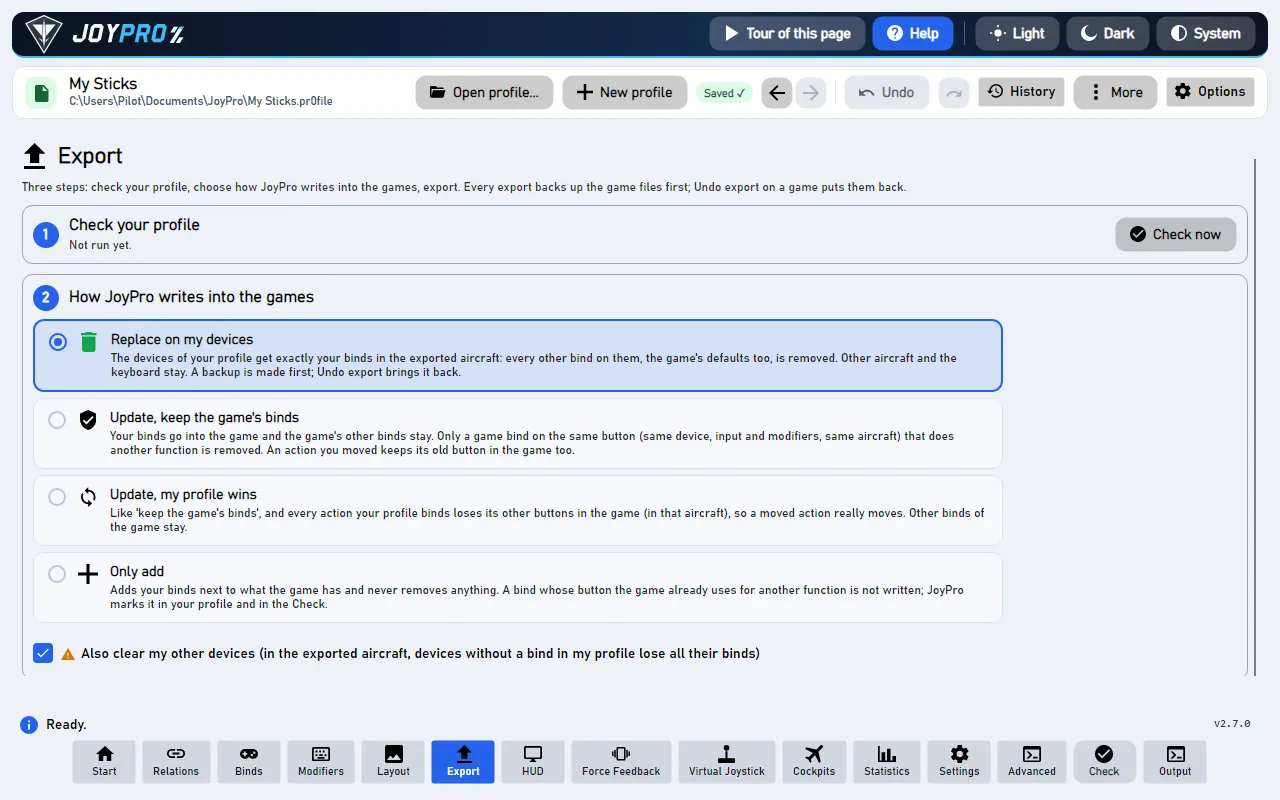
Start the game and open its controls page: your binds are in the rows of each command, on your devices. The exact menu path and how the page shows JoyPro's binds are not confirmed yet: the live check in the game is still to come.
#What you do yourself in Cliffs of Dover
- Start the game once. Blitz creates the
Documents\1C SoftClub\il-2 sturmovik cliffs of doverfolder with a copy of the defaultconfUser.inion its first start. - Steam Cloud keeps copies of the file and has been reported to bring old binds back. If an export does not stick, turn Steam Cloud off for the game.
- Blitz and the USB port: Blitz's device name changes when you plug a device into another port. JoyPro finds the device by name and writes the current name (an old line is renamed, with a warning).
#Common pitfalls
- "The game is running": close it and export again. The original's process is called
Launcher, a name other programs use too; JoyPro checks the game's own program. - Binds came back old: Steam Cloud restored an older file (see above).
- Two identical devices on Blitz: they are told apart only by the id from their USB path. JoyPro matches a line by name alone only when one connected device has that name, so after moving one of them to another port, check the binds.
#Files JoyPro reads and writes
| File | What it is |
|---|---|
%USERPROFILE%\Documents\1C SoftClub\il-2 sturmovik cliffs of dover\confUser.ini |
binds ([HotKey ...] sections) and axis settings ([Config pilotMove]) of both games |
%USERPROFILE%\Documents\1C SoftClub\il-2 sturmovik cliffs of dover - MOD\confUser.ini |
the pre-Blitz Team Fusion mod (listed for the original) |
<install>\confUser.ini |
the defaults, read for the command list only |
confUser.ini.joypro.json |
the inputs JoyPro wrote |
conf.ini, user.ini, bldconf.ini and "Save As" profiles in the same folder are not touched.
#The export modes in Cliffs of Dover
| Mode | What happens in the game |
|---|---|
| Only add | Nothing is removed. A bind on an input the game uses for another command is not written and is listed. |
| Update, keep the game's binds | Your binds go in; a game bind on an input you give another command is removed, the rest stays. |
| Update, my profile wins | As above, and every command you bind loses its other inputs (keyboard only with the keyboard option). |
| Replace on my devices | The devices you write keep only your binds in the managed sections. |
| + Also clear my other devices | The other connected devices lose their lines in the managed sections. |
#What is never touched
- The
[HotKey vehicle]section (ground vehicles), mouse and keyboard lines (keyboard only with the keyboard option). - Devices that are not connected, lines the import cannot read, lines without a device (defaults the game could not resolve), the import's ignored devices and the vJoy device JoyPro tunnels into.
- Unknown sections, such as the mission builder's, byte for byte.
#Curves and settings
- Granularity: global. One file for all aircraft; axis settings are per command, not per device axis.
- Axis settings (axis model
il2cod): aileron, elevator and rudder have sensitivity (0 linear to 1 most curved), centre dead zone and end dead zone; the other axes a dead zone at the low and the high end; the throttles keep their five values as imported. The Default curve is fitted (dead zone to the centre, saturation to the end, a positive curvature to sensitivity). The preview's formula is an assumption. - Invert: the sign before the command (
=-1throttle). - In Update mode, values set in the game stay when JoyPro's are all zero. No force feedback or game settings.
- Watcher: changes in
confUser.iniare noticed after the game closes (the watcher).
#Inside the Cliffs of Dover integration
flowchart LR
  P["Your profile<br/>(relations + binds)"] --> B["Blitz (engine il2codblitz):<br/>device = product name<br/>+ hash of its USB path"]
  P --> O["Original (engine il2cod):<br/>Joystick, Joystick1 ...<br/>(Windows' order)"]
  B --> F["Documents / 1C SoftClub /<br/>il-2 sturmovik cliffs of dover /<br/>confUser.ini"]
  O --> F
  F --> G["The game's controls page"]
Code: engine\Games\Il2CodIntegration.cs (one class, two games), engine\Games\Il2LegacyIntegration.cs,
engine\Games\LegacyIniFile.cs.
- Lines:
<trigger> [<trigger> ...]=<command>; all triggers are held together and the last one fires, so the others become JoyPro modifiers (keys or joystick buttons). Button<device>+Key<b>(0-based, 128 buttons), axis<device>+AXE_<X|Y|Z|RX|RY|RZ|U|V>=<1|-1><command>, hatPov<angle> <device>+Pov(the first hat). - Devices, Blitz:
<product name>-<id>, the DirectInput product name with blanks and+as_; the id is a 31-bit hash of the device's interface path (DIPROP_GUIDANDPATH), printed in hex. JoyPro computes the same id from the path (engine games devicesshows it), matches by name and id, else by name when only one connected device has it. Up to 16 devices. - Devices, original:
Joystick,Joystick1,Joystick2... in DirectInput order, up to 8 devices. - Command list:
engine il2codblitz refresh-db/engine il2cod refresh-db: JoyPro's own command list (ids such aspilotMove.aileron,pilot.trigger0) plus every command of your file and the install's default file. - Import / export:
engine il2codblitz import,engine il2codblitz scan,engine il2codblitz exportand the same forengine il2cod export. Backup before the first write.
#Known limits
- Not yet checked in the game: binds made on Blitz's controls page, a second hat, the throttles' five values and
whether Blitz still reads the old
Joystick<n>names. The original game is checked against its default file only. - Tests:
engine\tests\smoke\il2cod.ps1; in the gametools\e2e\games\IL2CoDBlitz.ps1(written, not run yet).
All technical notes on this game (generated from the repository): il2-cliffs-of-dover.md.