
Elite Dangerous keeps its controls in presets, one .binds file each, and every action has two places for an input:
Primary and Secondary. JoyPro reads the flight binds of your Ship preset into your profile and writes them back into
the same file, in place. SRV, on-foot, camera and menu binds stay as they are. When both places of an action are
taken, JoyPro says so instead of overwriting one.
Elite Dangerous native (its own bind files)
- Support
- native (its own bind files)
- Engine command
engine elite- Bind file
%LOCALAPPDATA%\Frontier Developments\Elite Dangerous\Options\Bindings\<preset>.4.x.binds(XML)- Command list from
- the stock and your
.binds;DeviceMappings.xmlof the install - In-game test
- 23/23 steps passed (2026-10-11)
- ✓ Import
- ✓ Export
- ✓ Keyboard binds
- ✓ Modifiers
- ✓ Command list built on your PC
- ✓ Game watcher
- ✓ Axis curves and dead zones
- ✓ Game control settings
- ✗ In-game force feedback settings
- ✗ Force feedback from telemetry
- ◐ Telemetry recordingThe game's telemetry has no world position: recorded and exported as CSV, no Tacview (ACMI) track.
- ✓ Virtual joystick (vJoy)
- ◐ Virtual Xbox pad
- ✓ Virtual functions
- ✓ Setup wizard / Auto Assign
- ✓ Cockpits
- ✓ Cheat sheets
- ✓ In-game test
From the support matrix, generated from the engine’s code: all games.
#Get it working in 3 steps
- Set it all up for me
on the Start page - Use these buttons
look at the list first - Write to my game
keep Elite Dangerous closed
Before: save your controls once in the game. Change one ship control, save, close the game.
Then: keep every device of the preset connected when you start the game. Your binds are in Options > Controls.
Did you bind buttons in Elite Dangerous before? Then the Start page offers Import, then fill the gaps. Your binds stay, and only free buttons get new jobs. See Quick start: make my stick work.
#What JoyPro does for Elite Dangerous
- Import: the ship's flight binds on your sticks, throttles and panels come into your profile, with their invert and dead zone, and whether your throttle runs forward only or with reverse.
- Relations: one relation is one function in every game. "Landing gear" can be the same switch in Elite, Star Citizen and DCS.
- Export: JoyPro edits your Ship preset (
Custom.4.x.binds) in place. Everything else in the file stays.
#Import your Elite binds
- Open Start. If the Elite Dangerous card asks for a command list, press Build List: JoyPro collects the game's actions from its stock presets and the presets you saved (read only).
- Press Import on the Elite Dangerous card. Keep Add to my profile. Tick Also take the keyboard keys if you want your flight keys in JoyPro too.
- Press Import now. See my relations opens what came in.
A bind that uses half of an axis as a button or as a modifier cannot be held by a JoyPro profile: the import skips it with a warning, and the export leaves it in the game.
#Build and check relations
Join the same function of your games with the relations flow. Then press Check on the Export page. Besides one button that does two things, the Check lists under Not written to the game every bind the last export had no place for, with Move to another button and Keep as is.
#Export to Elite
- Close Elite Dangerous. JoyPro refuses to write while the game runs.
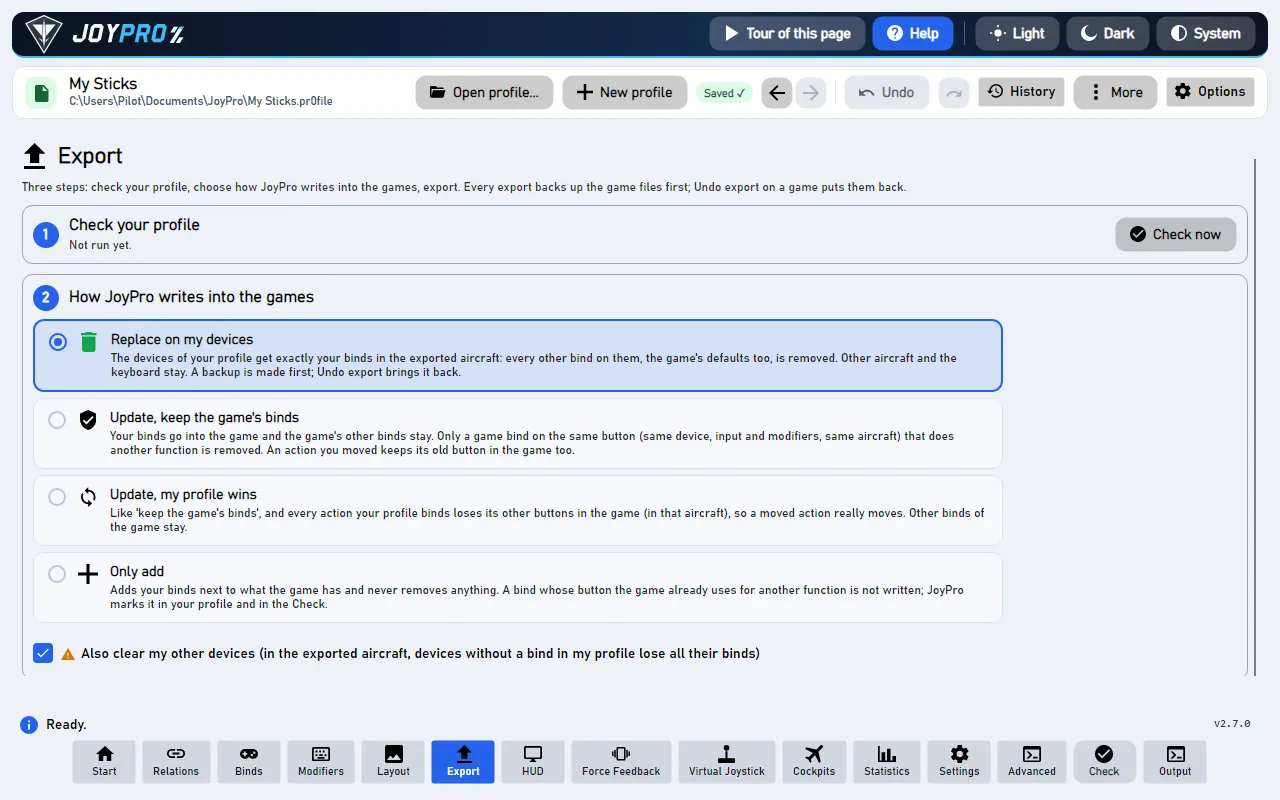
- Open Export and tick the Elite Dangerous card.
- Keep Replace on my devices with Also clear my other devices if JoyPro is where you set up your sticks. Press Export now on the card.
- Read the result: binds that did not fit and half-axis binds JoyPro kept are named in plain words.
Start the game and open Options > Controls, then the ship controls. Your binds are in the Primary or Secondary column of each action, next to the keyboard keys you kept. Inverted axes show INVERTED, the throttle shows Forward only or Full range under its axis range, and the yaw-into-roll and head look rows show the values you set in JoyPro.
#What you do yourself in Elite
- Save your controls once in the game. JoyPro writes only into a preset you saved yourself. If your Ship controls
still use a stock preset (Generic Joystick, a HOTAS preset of the game), change one control in Options >
Controls (Ship), save, and close the game: Elite then creates
Custom.4.x.bindsand uses it. - Keep every device of the preset connected when you start the game. Elite ignores a whole preset that names a device it cannot find. JoyPro warns when your preset names a device that is not connected.
#Common pitfalls
- "Elite Dangerous is running": quit the game and export again.
- "No free place in the game": Elite keeps two inputs per action. If a keyboard key holds one place and two of your relations put the action on two buttons, only the first button fits. Move the second one, or keep it as is.
- Two identical sticks: Elite tells devices apart by their USB id only. Two connected devices of the same model cannot be matched to the game's index, so JoyPro skips both.
- The game loaded another preset: a device of the preset was missing at start. Connect it, exchange it in JoyPro, or clear its binds in the game.
- Hat diagonals do not exist in Elite: four directions per hat.
#Files JoyPro reads and writes
| File | What it is |
|---|---|
%LOCALAPPDATA%\Frontier Developments\Elite Dangerous\Options\Bindings\<preset>.4.<minor>.binds |
your preset (XML): every action with Primary and Secondary, axes with Binding, Inverted and Deadzone, and value settings such as ThrottleRange. JoyPro writes the newest minor version of the Ship preset. |
...\Bindings\StartPreset.4.start |
which preset each category uses (General, Ship, SRV, On Foot); read only |
...\Bindings\<preset>.4.<minor>.binds.joypro-meta.json |
JoyPro's names, groups, modifiers and tuning of the written binds, read back by the next import |
...\Bindings\<preset>.4.<minor>.binds.jpbak |
the copy from before the first write, plus JoyPro's versioned backup store |
<install>\Products\<product>\ControlSchemes\*.binds, DeviceMappings.xml |
the stock presets and the game's device names; read only |
The file is edited as text: line endings, tabs, the declaration, duplicate elements, value settings, your keyboard
layout and unknown elements stay byte for byte. JoyPro never writes to the install folder, never edits
StartPreset.4.start, and never touches the files of the old 3.x client.
Galaxy map actions belong to the General preset. JoyPro writes them only when General and Ship use the same file; otherwise they are skipped with a warning.
#The export modes in Elite
Every mode works on flight actions only and on the slots of connected joysticks.
| Mode | What happens in the preset |
|---|---|
| Only add | A bind goes only into a free place. A bind whose input another flight action uses is not written and gets a mark "Not written to the game". |
| Update, keep the game's binds | The place of another flight action on an input you use is released. Your bind goes into a free place first, so an action you moved keeps its old input while a place is free. |
| Update, my profile wins | As above, and every action you bind loses its other places on your joysticks (the keyboard only with the keyboard option). |
| Replace on my devices | On the devices you write, every flight place that holds a bind of that device and is not in your profile is emptied ({NoDevice}; an axis also gets Inverted 0 and Deadzone 0). |
| + Also clear my other devices | The same for the flight places of connected joysticks the export does not use. |
A place is never overwritten when it holds a keyboard key, a mouse or gamepad input, or a device JoyPro does not write. If no place is left, the bind is not written and the profile keeps a mark ("Binds Not Written, No Free Place In The Game"). The same holds for an axis action whose one place holds another axis of your profile.
#What is never touched
- SRV, on-foot, camera, colonisation, UI and mouse actions, even though they sit in the same file.
- Keyboard, mouse and gamepad places; the keyboard is written only with the keyboard option and never cleared.
- Places of a device that is not connected, the import's ignored devices and the vJoy device JoyPro tunnels into.
- Half-axis binds and half-axis modifiers: the export leaves them and names each one, for example "'Cycle Next Ship': kept the game's bind ... with ... RZ axis, positive half as modifier".
<Hold>and<ToggleOn>of an action stay as they are.
#Ships, curves, game settings
- Granularity: one Ship preset for every ship and fighter. The SRV and on-foot presets are not written.
- Modifiers: up to three per place; keys, buttons of any device. JoyPro writes its modifiers as the game's
<Modifier>entries. - Axis settings: invert and dead zone (0 to 1) per axis action; there is no saturation and no curve in Elite. Invert keeps DCS's direction in your relation: Elite counts pitch, throttle and the vertical thrusters the other way round, so the file's Inverted is your invert turned over for those axes. The throttle relation's Slider sets Throttle Axis Range: Slider = forward only, no Slider = full range with reverse (warning when several throttle relations disagree).
- Game settings: yaw into roll (normal, flight assist off, landing), its sensitivity, the keyboard throttle
increment, head look mode, increment, sensitivity, smoothing and reset on toggle. Set them in Settings > Force
feedback settings of the games (pick Elite Dangerous) or with
engine ffb set. Only settings you set are written, in place; a setting missing from the file is reported, never added. Mouse, SRV and on-foot settings are not managed. - Force feedback: Elite has none for joysticks.
- Telemetry recording: JoyPro can record
Status.jsonand the journal (Saved Games\Frontier Developments\Elite Dangerous, read only) as a CSV session; the game gives no world position, so there is no Tacview track. - Watcher: a bind you change in the game's controls menu is noticed after the game closes; JoyPro asks whether to take it over. The game writes the preset only when you save in its controls menu.
- HUD: the HUD finds the game by its process and shows your Elite binds.
#Inside the Elite integration
flowchart LR
  S["StartPreset.4.start"] --> F["Custom.4.x.binds"]
  P["Your profile"] --> E["engine elite export"]
  F --> E
  E --> W["Written: a place<br/>is free or yours"]
  E --> N["Not written:<br/>both taken"]
  W --> G["Options ><br/>Controls"]
Code: engine\Games\EliteDangerousIntegration.cs, the axis model engine\AxisModels\EliteDangerous.cs and the
settings model engine\FfbModels\EliteDangerous.cs.
- Device ids:
%04X%04X, the USB vendor id and product id in upper-case hex (231D0125). Devices listed in the install'sDeviceMappings.xmlare written by their symbolic name instead (T16000M,ThrustMasterWarthogJoystick,VPCThrottle, Alternatives included). JoyPro writes connected devices only. Identical devices would need the game'sDeviceIndex, whose order is not documented: skipped. - Input names:
Joy_1...Joy_Nbuttons,Joy_POV<h>Up/Right/Down/Left(hats 1 to 4),Joy_XAxis...Joy_RZAxis,Joy_UAxis/Joy_VAxisfor the sliders,Key_*keyboard.Pos_Joy_*/Neg_Joy_*(half axes) are never created. - Invert: file
Inverted= relation invert XOR the action's natural direction (1 forPitchAxisRaw,ThrottleAxis,AheadThrust,VerticalThrustRaw, their alternate and landing copies,HeadLookPitchAxisRaw,CamTranslateYAxis,ExplorationFSSRadioTuningX_Raw; 0 for every other axis). The import reads it back the same way. A device that reports an axis reversed needs invert in DCS too, and the XOR carries that over. - Command list:
engine elite refresh-dbreads the.bindsthe game wrote (they name every element it knows) and the stock presets, read only; only ship flight elements are added, known actions keep id and title.engine elite cataloglists it,engine elite pathsshows the files JoyPro found. - Import / export:
engine elite importandengine elite scan;engine elite export--mode clean|add|merge|merge-overwrite --nuke-untouched-devices --include-keyboard --ignore-device <d> --dry-run. - Game settings:
engine ffb set --device * --game EliteDangerous --param <key>=<value>(yawToRollMode,yawToRollSensitivity,throttleIncrement,headlookAccumulate, ...).
#Known limits
- Two identical devices are skipped; a missing device makes the game ignore the whole preset.
- The scale of the dead zone slider in the game's menu and how the game rescales outside the dead zone are not confirmed yet.
- Buttons: about 32 are reported by players; higher numbers have worked. Four hats, no diagonals.
- An action the file does not have is skipped with a warning (adding one is not confirmed yet).
- Tests:
engine\tests\smoke\elite.ps1; in the gametools\e2e\games\Elite.ps1(binds and mode matrix) andtools\e2e\games\EliteSettings.ps1(invert direction, throttle range, game settings).
All technical notes on this game (generated from the repository): elite-dangerous.md.