
IL-2 Series: Korea comes from the same family as IL-2 Great Battles but keeps its key mapping in a new JSON format: one profile ("General") for all aircraft, inside the game's installation. JoyPro reads it into your profile, joins its actions with your other games in relations and writes them back, including the response curves of the game's curve editor and its force feedback settings.
IL-2 Series: Korea native (its own bind files)
- Support
- native (its own bind files)
- Engine command
engine il2korea- Bind file
<install>\data\input\general.actions(JSON) +known.devices.json; curves ingeneral.pitch/shared.responses; settings indata\NSData\UserData\UserSettings.json- Command list from
general.actions; titles from IL-2 Great Battles' list or JoyPro's wording- In-game test
- 49/49 steps passed (2026-10-11)
- ✓ Import
- ✓ Export
- ✓ Keyboard binds
- ✓ Modifiers
- ✓ Command list built on your PC
- ✓ Game watcher
- ✓ Axis curves and dead zones
- ✓ Game control settings
- ✓ In-game force feedback settings
- ✓ Force feedback from telemetry
- ◐ Telemetry recordingThe game's telemetry has no world position: recorded and exported as CSV, no Tacview (ACMI) track.
- ✓ Virtual joystick (vJoy)
- ◐ Virtual Xbox pad
- ✓ Virtual functions
- ✓ Setup wizard / Auto Assign
- ✓ Cockpits
- ✓ Cheat sheets
- ✓ In-game test
From the support matrix, generated from the engine’s code: all games.
#Get it working in 3 steps
- Set it all up for me
on the Start page - Use these buttons
look at the list first - Write to my game
keep the game closed
Before: save a key mapping once. Open Settings > Key mapping and press ACCEPT. Close the game.
Then: your binds are in Settings > Key mapping, in every aircraft.
Did you bind buttons in IL-2 Korea before? Then the Start page offers Import, then fill the gaps. Your binds stay, and only free buttons get new jobs. See Quick start: make my stick work.
#Look around without head tracking
No TrackIR, no VR? The setup puts the snap views on one hat of your stick: forward, back, left and right. The look axes go on the mini stick of your throttle, when it has one. See Head tracking and looking around.
#What JoyPro does for IL-2 Korea
- Import: every action of the key mapping that sits on a stick, throttle, pedals or panel comes into your profile, with modifiers, the invert of each axis and the values of the curve editor. Keyboard keys come in when you ask.
- Relations: one relation is one function in all your games, for example "Gear" in Korea, IL-2 Great Battles and DCS on the same button. Korea has one key mapping for every aircraft.
- Export: JoyPro writes the key mapping and gives each of your devices a device number, as the game's own "assign device number" dialog does.
#Import your Korea binds
- Open Start. The IL-2 Series: Korea card shows the game's picture. If it asks for a command list, press
Build List: JoyPro reads the game's
general.actions(every action gets JoyPro's own name and explanation). - Press Import on the card. Choose Add to my profile and tick Also take the keyboard keys if you want your flight keys too.
- Press Import now. See my relations opens what came in.
#Build and check relations
On the Relations page the Korea action of a relation sits next to the same function in your other games. Use the relations flow to join them, then press Check now on the Export page: it finds one button that does two things in Korea (the Check).
#Export to IL-2 Korea
- Close the game. JoyPro refuses to write while
IL2Series.exeruns. - Open Export. The IL-2 Series: Korea card shows how many of its relations are bound.
- Keep Replace on my devices with Also clear my other devices if JoyPro is where you set up your sticks. Press Export now on the card.
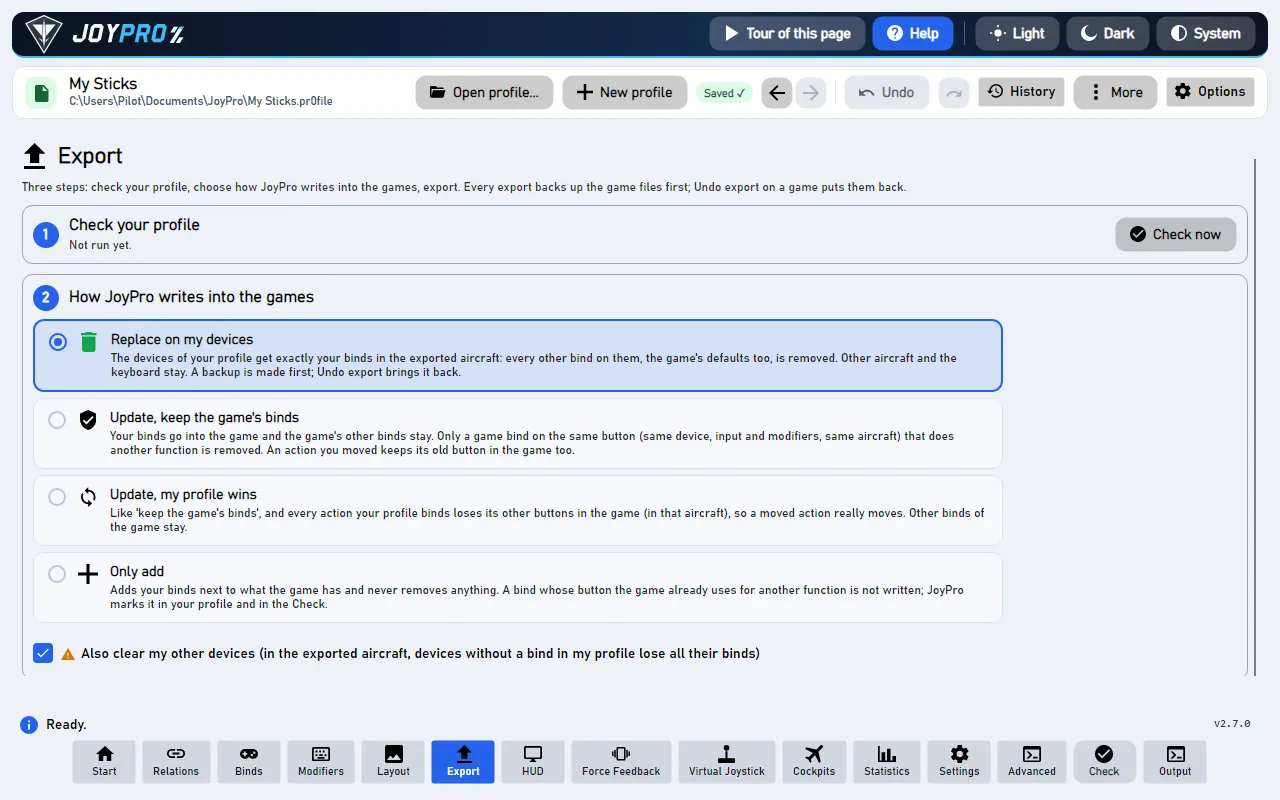
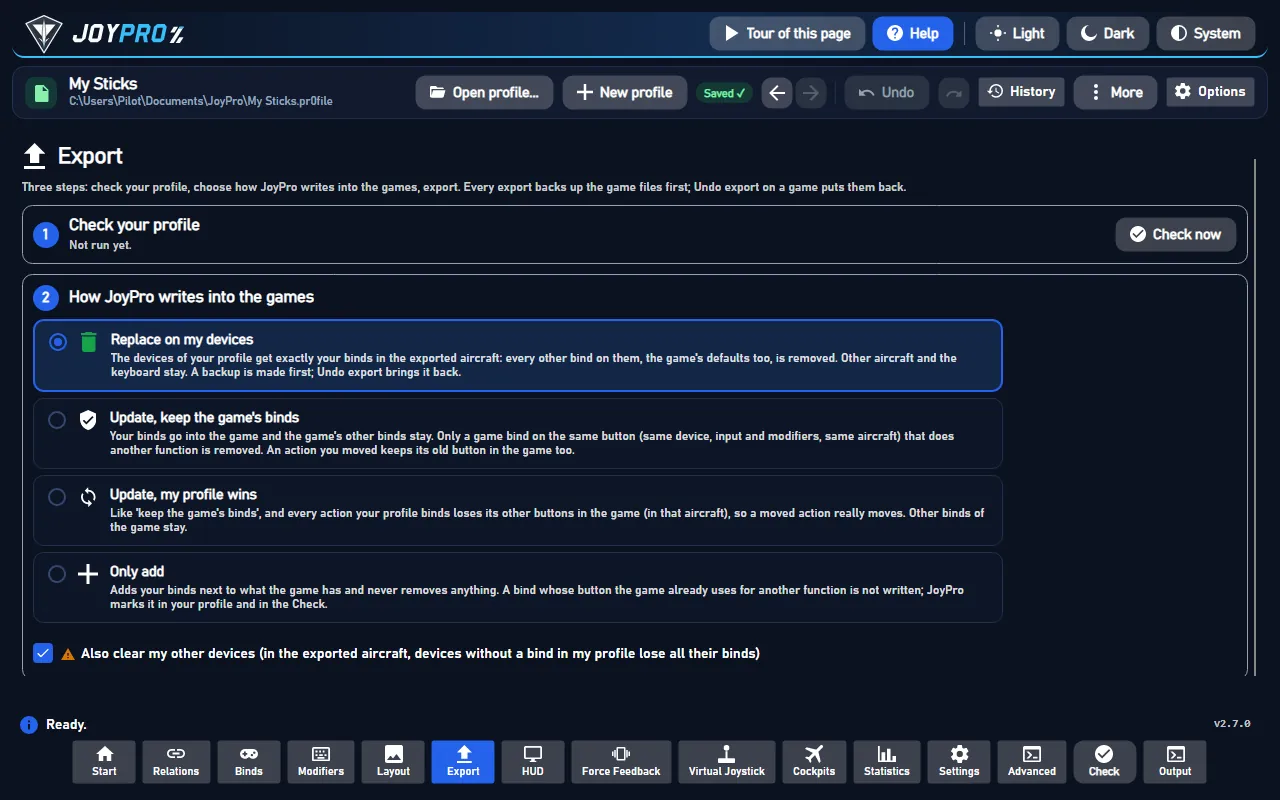
Start the game and open Settings > Key mapping. Your binds are in the action rows (for example on the Basic tab), with your device by name and its number ("joy 2"); the game does not ask for a device number. An axis row's curve icon opens the response editor with the values JoyPro wrote. Force feedback and the axis noise filter show on Settings > Input devices.
#What you do yourself in IL-2 Korea
- Save a key mapping once. The game writes
general.actionswhen you press ACCEPT in Key mapping. A first start also shows the game's user agreement. Withoutgeneral.actionsthere is nothing to export to. - The standalone version installs under
Program Filesby default, and Windows may protect that folder. The export then says so instead of writing half the files. - For JoyPro's own force feedback from the game's telemetry, the Force Feedback page adds JoyPro's address
to the game's
startup.cfg(close the game first). Switch the game's own force feedback off for that stick.
#Common pitfalls
- "IL-2 Korea is running": close the game and export again.
- A device was skipped: a device without a device number that is not connected cannot get one. Plug it in and export again.
- A bind is missing after "Only add": the input was used for another action in the game. The Check lists it under "Not written to the game".
#Files JoyPro reads and writes
| File | What it is |
|---|---|
<install>\data\input\general.actions |
the key mapping profile "General" (JSON): devices used, modifiers, every action with its inputs, Relative Control values |
<install>\data\input\known.devices.json |
every device the game has seen, with its device number |
<install>\data\input\general.pitch |
the pitch curve ("General (Common pitch curve)") |
<install>\data\input\shared.responses |
the curves of the other axes |
<install>\data\NSData\UserData\UserSettings.json |
Settings > Input devices: force feedback and the axis noise filter (section input) |
<install>\data\startup.cfg |
JoyPro's telemetry address (only when you set up telemetry force feedback) |
general.actions.joypro-meta.json |
JoyPro's names, groups, modifiers and tuning beside the file, read back by the next import |
<install> is steamapps\common\IL2Series for Steam, or the game folder below the standalone launcher.
current.map is compiled by the game; JoyPro never writes it.
#The export modes in IL-2 Korea
| Mode | What happens in the game |
|---|---|
| Only add | Nothing is removed. A bind whose input the game uses for another action is not written and is listed. |
| Update, keep the game's binds | Your binds go in; the game's other inputs stay, except a game bind on an input you give another action. |
| Update, my profile wins | As above, and every action you bind loses its other inputs (joysticks; keyboard only with the keyboard option). |
| Replace on my devices | Every joystick input of the devices you write is released; then your binds go in. |
| + Also clear my other devices | Connected devices without a bind in your profile lose their joystick inputs. |
#What is never touched
- Keyboard keys, mouse inputs and key pairs on axes in Replace (the keyboard changes only with the keyboard option).
- Devices that are not connected, lines the import cannot read, the import's ignored devices and the vJoy device JoyPro tunnels into.
current.map, the force feedback files per device and the game's other settings.
#Curves, Relative Control, force feedback
- Granularity: global. One key mapping for all aircraft; the pitch curve profile is assigned to every aircraft by default.
- Axis curves (axis model
il2korea): exponent (-100 to 100), centre and edge dead zones, the centre offset for pitch; for pitch, roll and yaw also the built-in response curve and the control surface loading. One-sided axes (throttles, brakes) get exponent and low/high dead zones over the whole travel. Camera axes have no editor and get no curve. Values are in the file's units; the game shows dead zones four times larger. - Relative Control (the ◆ button of an axis input): on/off, dead zone (0 to 80 %) and sensitivity (1 to 20), as the dialog shows them.
- Game settings (Settings > Force feedback settings of the games): force feedback on, shaking power, feedback power, low- and high-speed stick force, force-neutral rebalancing, terrain contact and the axis noise filter, in % as the game shows them.
- Telemetry force feedback and recording: from the game's telemetry output, as in Great Battles (CSV only, no Tacview track).
- Watcher: changes in
general.actionsare noticed after the game closes (the watcher).
#Inside the Korea integration
flowchart LR
  P["Your profile"] --> E["engine il2korea export"]
  E --> A["general.actions<br/>known.devices.json"]
  E --> R["general.pitch<br/>shared.responses"]
  E --> S["UserSettings.json"]
  A --> G["Settings ><br/>Key mapping"]
  R --> G
Code: engine\Games\Il2KoreaIntegration.cs, axis model il2korea in engine\AxisModels.
- Inputs:
dev<N>_b<button, 0-based>,dev<N>_axis_<x|y|z|w|s|t|p|q>(X, Y, Z, RX, RY, RZ, slider 1, slider 2),-before the token = inverted,*= Relative Control, hatsdev<N>_pov<hat>_<angle>, keyskey_<name>, combinations with+. - Devices:
known.devices.jsonkeys every device by its DirectInput instance GUID (in IL-2's byte order) and holds itsdeviceId(the number,-1= none) andident(vid_pid). A device JoyPro writes keeps its number; a connected device without one gets the lowest free number from 1 up. - Command list:
engine il2korea refresh-dbadds the actions of a key mapping file. Actions without an input are not ingeneral.actions, so a fresh list holds about 318 actions. JoyPro does not read the game's packed archives. - Import / export:
engine il2korea import,engine il2korea scan,engine il2korea export(--mode,--nuke-untouched-devices,--include-keyboard,--dry-run);engine il2korea pathsshows the files. - Settings and curves:
engine ffb set--device * --game IL2Korea --param ffForce=80,engine binds tuning set--scope game:IL2Korea(orfamily:il2),engine binds tuning preview(matches the game's compiled table to 1e-6, except the flat side of a centre offset). - Telemetry:
engine ffb telemetry setupil2korea.
#Known limits
- The game's own action texts are in its packed archives, which JoyPro does not read; JoyPro uses its own names.
- About 60 actions of the Key mapping page have no input in a fresh
general.actionsand are not in a freshly built list. - Tests:
engine\tests\smoke\il2korea.ps1,il2koreainstall.ps1; in the gametools\e2e\games\IL2Korea.ps1(49 of 49 steps),IL2KoreaCurves.ps1,IL2KoreaSettings.ps1.
All technical notes on this game (generated from the repository): il2-korea.md.