
Arma Reforger takes joysticks through a joystick preset file that you pick in the game's settings. JoyPro writes its
own preset, JoyPro.conf, with your helicopter binds on your joysticks, and you select it once. The game's own
rebind file is never touched. Reforger uses at most four joysticks, so JoyPro also writes the game's device order
rules that say which device is joystick 0, 1, 2 or 3.
Arma Reforger native (its own bind files)
- Support
- native (its own bind files)
- Engine command
engine reforger- Bind file
- JoyPro's own preset
...\customInputConfigs\JoyPro.conf(Enfusion text) + device order inReforgerEngineSettings.conf - Command list from
- the game's
.pakfiles and localization
- ✓ Import
- ✓ Export
- ✗ Keyboard binds
- ✗ Modifiers
- ✓ Command list built on your PC
- ✓ Game watcher
- ◐ Axis curves and dead zonesArma Reforger: multiplier and invert only; no dead zone or curve (the format is unknown).
- ✓ Game control settings
- ✓ In-game force feedback settings
- ✗ Force feedback from telemetry
- ✗ Telemetry recording
- — Virtual joystick (vJoy)Arma Reforger does not see vJoy devices (four starts): the export skips vJoy binds with a warning.
- ◐ Virtual Xbox pad
- ✓ Virtual functions
- ✓ Setup wizard / Auto Assign
- ✓ Cockpits
- ✓ Cheat sheets
- ◐ In-game testArma Reforger: the settings menus were explored in game; no scored run, the export is not yet checked in game.
From the support matrix, generated from the engine’s code: all games.
#Get it working in 3 steps
- Set it all up for me
on the Start page - Use these buttons
look at the list first - Write to my game
keep Arma Reforger closed
Before: start Arma Reforger once and open Settings > Controllers. Then close the game.
Then, once: in the game, open Settings > Controllers. Under Joystick preset, pick JoyPro. Restart the game. After later exports a restart is enough.
Did you bind buttons in Arma Reforger before? Then the Start page offers Import, then fill the gaps. Your binds stay, and only free buttons get new jobs. See Quick start: make my stick work.
#What JoyPro does for Arma Reforger
- Import: the helicopter binds of the joystick preset come into your profile, with their multiplier and invert.
- Relations: one relation is one function in every game. "Collective" can be the same lever in Reforger, Arma 3 and DCS.
- Export: JoyPro writes
JoyPro.confwith only the helicopter flight actions and your joysticks, and sorts your devices into the game's four joystick slots. Infantry and vehicle controls, keyboard, mouse and gamepad stay as the game has them.
#Import your Reforger binds
- Open Start. If the Arma Reforger card asks for a command list, press Build List: JoyPro reads the helicopter actions and their names from the game's files (read only).
- Press Import on the Arma Reforger card and keep Add to my profile.
- Press Import now. See my relations opens what came in.
Keyboard binds and modifiers are not imported or exported in Reforger: JoyPro manages your joysticks only.
#Build and check relations
Join the same function of your games with the relations flow, then press Check on the Export page. The vanilla game has helicopters only (UH-1H, Mi-8); airplane actions come only with mods.
#Export to Arma Reforger
- Close Arma Reforger. The game writes its settings when you change them, so JoyPro refuses to write while it runs.
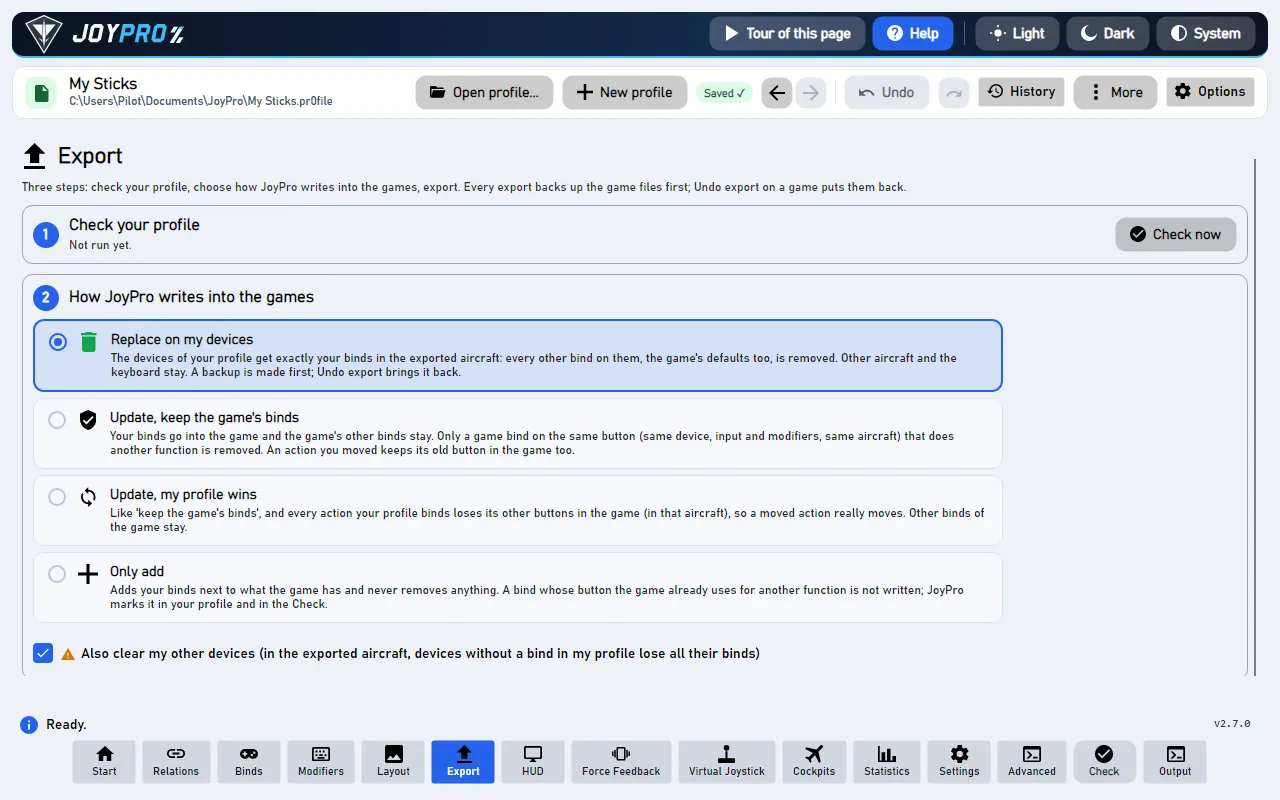
- Open Export and tick the Arma Reforger card.
- Keep Replace on my devices with Also clear my other devices if JoyPro is where you set up your sticks. Press Export now on the card.
Start the game and open Settings > Controllers. Under Joystick preset pick JoyPro (once), then restart the game. The Devices list shows your joysticks in the slots JoyPro chose. The preset's binds do not show in Settings > Controls: that page lists only the keyboard and gamepad columns.
#What you do yourself in Arma Reforger
- Select the preset once: Settings > Controllers > Joystick preset > JoyPro, then restart. After later exports a restart is enough. Picking a gamepad Controller preset there replaces the joystick preset: only one of them can be active.
- Start the game once and open Settings > Controllers before the first export. JoyPro writes the device order only into the settings file the game already saved; without it, it numbers your devices the way the game would and warns.
- Four joysticks at most. The game takes the first four that send input after it starts; any further device replaces the fourth. With more devices, unplug or hide the others (for example with HidHide) while you play Reforger. The Virtual Joystick mode can merge your devices into one, but a vJoy device did not show up in the game in four starts.
#Common pitfalls
- Nothing happens in flight: the JoyPro preset is not selected, or the game was not restarted after the export.
- A stick is missing: more than four joysticks send input, or the device never sent input while the game window had focus. Move one of its axes or press a button with the game window in front.
- Two identical devices: the game tells devices apart by their name, so two of the same model get one slot rule; the second gets no slot.
- Stable and experimental: the two builds keep separate settings folders. JoyPro writes the device order into every settings folder it finds.
#Files JoyPro reads and writes
| File | What it is |
|---|---|
%USERPROFILE%\Documents\My Games\ArmaReforger\profile\.save\settings\customInputConfigs\JoyPro.conf |
JoyPro's own joystick preset (Enfusion text): one Action block per helicopter action with its joystick sources and filters |
...\profile\.save\app<id>_user<steam id>\settings\ReforgerEngineSettings.conf |
the game's engine settings; JoyPro edits only the JoystickOrderRule entries under DeviceOrderRules |
...\app<id>_user<steam id>\settings\ReforgerGameSettings.conf |
the game settings; JoyPro edits only the HOTAS collective mode and the force feedback intensity when you set them |
JoyPro.conf.joypro-meta.json |
JoyPro's names, groups and tuning of the written binds, read back by the next import |
*.jpbak |
copies from before the first write, plus JoyPro's versioned backup store |
The game's own rebind file InputUserSettings.conf is never touched, and neither are your other presets in
customInputConfigs. Older builds name the two settings files EngineUserSettings.conf and GameUserSettings.conf
(same content).
#The device order rules
The game lists at most four joysticks (joystick0 to joystick3) and gives a device a slot when a rule's name is part
of the device's name. On export JoyPro:
- gives the devices you chose a slot for that slot (the
joystickSlotsetting, 0 to 3; -1 = automatic); - keeps the slot an existing rule gives a device (also the game's own rules with the long name);
- gives the other devices the lowest slot no rule claims.
Each rule uses the device's HID product name (the game's name contains it). JoyPro changes a slot in place or adds a
rule, and writes slots 0 to 3 only. It warns when more than four devices are used, when no slot is left or when two
chosen slots are alike. The import maps joystickN back through the same rules.
#The export modes in Arma Reforger
Only the flight Action blocks of the preset change. Keyboard, mouse and gamepad sources and joysticks that are not
connected always stay.
| Mode | What happens in JoyPro.conf |
|---|---|
| Only add | Every source stays. A bind whose joystick input another flight action uses is not written and gets a mark "Not written to the game". |
| Update, keep the game's binds | Your sources go in; the source of another flight action on the same input is removed. The action's old sources stay. |
| Update, my profile wins | As above, and an action you bind loses its other joystick sources of connected devices. |
| Replace on my devices | The flight sources of the devices you write are dropped and replaced by yours. |
| + Also clear my other devices | The same for connected devices without binds in your profile. |
A block left without sources is removed.
#What is never touched
InputUserSettings.conf, your other presets and every infantry, vehicle and menu action.- Keyboard, mouse and gamepad sources; joysticks that are not connected; the import's ignored devices and the vJoy device JoyPro tunnels into.
- Every line of the two settings files except the order rules and the two settings JoyPro holds. A missing settings block is not created (JoyPro warns: change the setting in the game once).
- Workshop mods are not read.
#Helicopters, curves, settings
- Granularity: one set of binds for every helicopter (the game's Helicopter context).
- Axis settings: per bind a multiplier and invert, written as the game's value filter on both halves of the axis. Reforger's dead zones and curves per device axis are not written (their format is not known yet).
- Buttons act like the game's keys: a button gets the same preset and filter the game's own default source of that action has (click, hold, repeat), so "Engine start" is held and "Sight range down" repeats.
- Game settings: HOTAS collective mode (Default, Manual, Sticky, Direct; the game's default for a HOTAS is Direct)
and force feedback intensity (0 to 3); per device the
joystickSlot. Set them in Settings > Force feedback settings of the games (pick Arma Reforger) or withengine ffb set. An export without Reforger binds still writes them. - Watcher: a change in the preset or in the game settings is noticed after the game closes; JoyPro asks whether to take it over.
- HUD: the HUD finds the game by its process and shows your Reforger binds.
#Inside the Reforger integration
flowchart LR
  P["Your profile<br/>(helicopter relations)"] --> E["engine reforger export"]
  E --> J["customInputConfigs /<br/>JoyPro.conf<br/>(JoyPro's own preset)"]
  E --> R["ReforgerEngineSettings.conf<br/>device order: slots 0 to 3"]
  J --> U["You, once: Settings > Controllers<br/>> Joystick preset = JoyPro;<br/>then restart the game"]
  R --> U
Code: engine\Games\ArmaReforgerIntegration.cs, engine\Games\ReforgerCatalogSource.cs, engine\Games\EnfusionPak.cs,
the axis model engine\AxisModels\ArmaReforger.cs and the settings model engine\FfbModels\ArmaReforger.cs.
- Format: Enfusion text, one-space indentation,
Key Value, objectsClass "{16 hex digits}" {; every new object gets a unique random id. Inputs:joystick0:button4(0-based),joystick0:axis6, half axesjoystickN:axisA+/axisA-, hatsjoystickN:pov_up|pov_down|pov_left|pov_right; axes 0 to 7 = X, Y, Z, Rx, Ry, Rz, Slider 0, Slider 1. A whole-axis action is written asjoystickN:axisA(inverted by a negativeMultiplier). - Devices: the game detects a joystick from raw input (usage page 1, usage 4) when it first sends a report while the game window has focus; gamepads and multi-axis controllers are never joysticks here. Its table holds four entries; a fifth new device overwrites the fourth.
- Command list:
engine reforger refresh-dbreadsConfigs/System/chimeraInputCommon.conf, the menu titles ofkeyBindingMenu.confandlocalization.en_us.conffrom the game's.pakarchives (read only), plus the actions of your presets; only Helicopter / Airplane contexts count.engine reforger cataloglists them,engine reforger pathsshows the files found. - Import / export:
engine reforger import,engine reforger scan;engine reforger export--mode clean|add|merge|merge-overwrite --nuke-untouched-devices --ignore-device <d> --dry-run. - Settings:
engine ffb set --device * --game ArmaReforger --param hotasCollective=<0..3>(alsoforceFeedbackIntensity);--device "<device>" --param joystickSlot=<0..3>; a slot above 3 is refused.
#Known limits
- The export is not checked in the running game yet; the settings menus were.
- Multiplier and invert only; no dead zone or curve.
- Four joysticks at most; a vJoy device did not appear in the game in four starts, so the virtual joystick is suggested only for more than four devices.
- Whether a preset replaces or adds to the game's default keyboard sources is not confirmed yet.
- Tests:
engine\tests\smoke\arma.ps1(filter, order rules, game settings, refusals).
All technical notes on this game (generated from the repository): arma-reforger.md.